


AwardWallet receives compensation from advertising partners for links on the blog. The opinions expressed here are our own and have not been reviewed, provided, or approved by any bank advertiser. Here's our complete list of Advertisers.
In a world full of AI slop and uninspired content, the AwardWallet Blog is more committed than ever to creating content that matters. How to earn more points and turn them into incredible experiences? Absolutely. Timely coverage of deals, promotions, and offers worth your attention? You bet. That’s just a small snapshot of what we do, but you get the idea.
That said, you might have noticed it’s gotten a bit harder to see AwardWallet Blog posts in your Google search results. That’s due to a few factors, including half-baked AI summaries of what you searched. Fortunately, though, Google now gives you a way to see more of the content you actually care about by adding AwardWallet as a preferred source. Just note that this feature is only available in the U.S. and India.
The process is quick, easy, and takes less than 30 seconds. Here’s how to do it.
How to Add AwardWallet as a Preferred Source on Google
One of the Google's newest features lets you choose which publishers you’d like to see more from. Adding a publisher like AwardWallet to your list of Google preferred sources means you’ll see more of our content across Google.
While it’s not an exact science, this likely means AwardWallet results will appear higher in Search, Discover, and “Top Stories.”
Steps to add a preferred source on Google
If you’d like to see more from the AwardWallet Blog, it’s worth spending a few seconds to add us as a preferred source on Google. Here are two ways to do so.
- The quickest way is to click here on your desktop or mobile device. Check the box on the right-hand side of the search results to add AwardWallet.
- If you see “Sorry! This page isn't available Your account is not eligible for this type of personalisation preference,” this means you are in a country where Google Preferred Sources is not yet available.
- Alternatively, you can click here to open Google’s preferred sources page, then type in “AwardWallet” and check the box. Once successfully added, you’ll see AwardWallet listed under “Your sources” at the bottom of the screen.
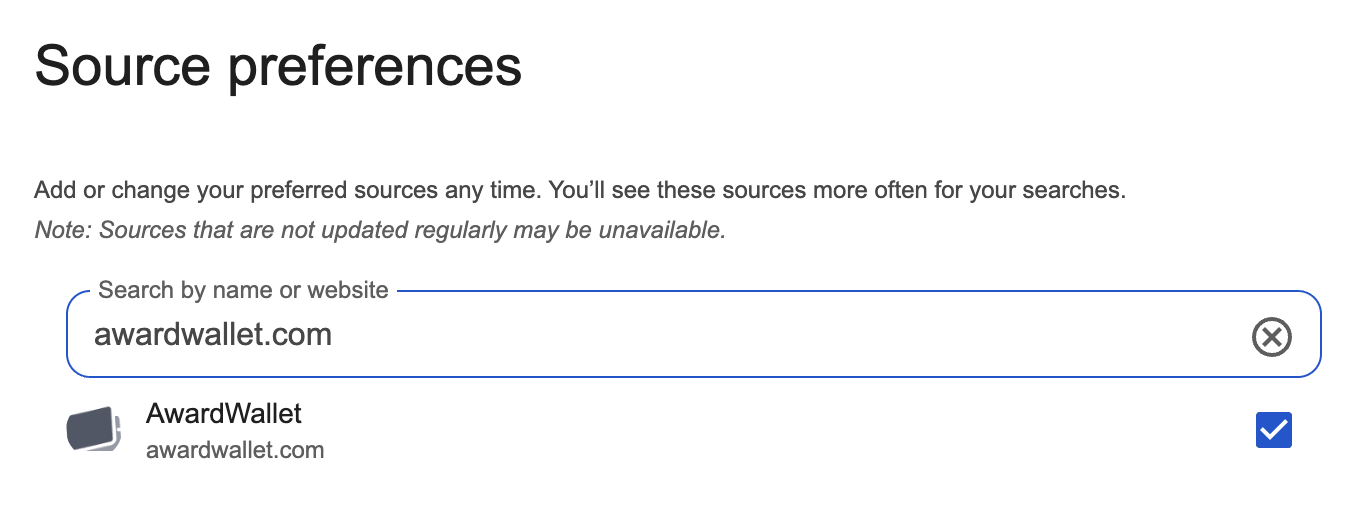
And that’s it. It’s an easy way to see more AwardWallet content as you search for all things award travel, credit cards, and more. This should also make it easier for you to spot timely news and promotions from the AwardWallet Blog, which could start showing up in the “Top Stories” curated for you at the top of your Google search results.
Bottom Line
If you want to see more from the AwardWallet Blog — and there are plenty of ways to do that, from getting notified about new posts to receiving editor-in-chief JT Genter's hand-curated weekly recap emails — it’s now easier than ever before.
One of the newest options is adding AwardWallet as a preferred source on Google. It’s quick, easy, and helps make your search results and online experience more personalized to what you actually want to read.
The comments on this page are not provided, reviewed, or otherwise approved by the bank advertiser. It is not the bank advertiser's responsibility to ensure all posts and/or questions are answered.