


AwardWallet receives compensation from advertising partners for links on the blog. The opinions expressed here are our own and have not been reviewed, provided, or approved by any bank advertiser. Here's our complete list of Advertisers.

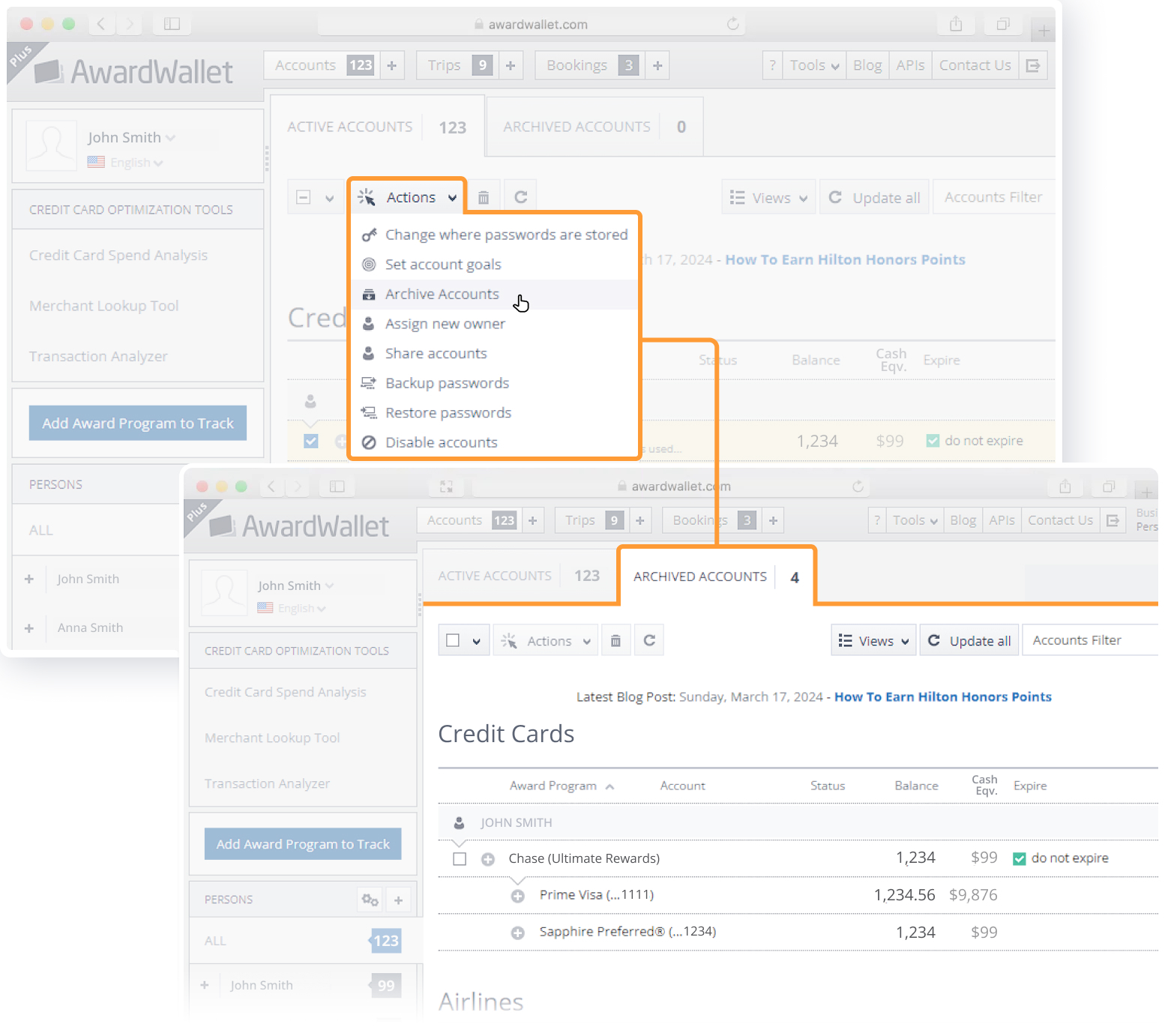
Are you overwhelmed by too many accounts appearing on your AwardWallet dashboard? You can now declutter by moving the accounts you no longer need into the “Archived Accounts” tab. Once an account is archived, it won't appear in your main “Active Accounts” list. Please note that this feature is not yet available on our mobile interface.
Tip of The Day
You can choose to store all of your loyalty account passwords locally on your device, instead of storing them in our secure database. If you choose this option, you can (and should) periodically back them up into a file. In the event that you delete your cookies, these passwords will be deleted. With a proper backup, you'd be able to safely restore from that backup file.
Screenshot showing how to backup your account passwords from your AwardWallet account

The comments on this page are not provided, reviewed, or otherwise approved by the bank advertiser. It is not the bank advertiser's responsibility to ensure all posts and/or questions are answered.