




AwardWallet receives compensation from advertising partners for links on the blog. The opinions expressed here are our own and have not been reviewed, provided, or approved by any bank advertiser. Here's our complete list of Advertisers.
Offers for the Southwest
Southwest Airlines has been reinventing how it operates. From bag fees to assigned seating, a new Southwest is here to stay. Passengers now choose from three categories of seats. Fortunately, there are multiple ways to avoid seat selection fees, but all these moving parts can make the process a bit confusing.
In this post we’ll break down how to avoid seat selection fees, what seats cost if you choose to pay, and how to book and pick your seat.
Overview of Southwest’s Assigned Seating Policies
Southwest offers three seat categories: Standard, Preferred, and Extra Legroom, as shown in the seat map below:
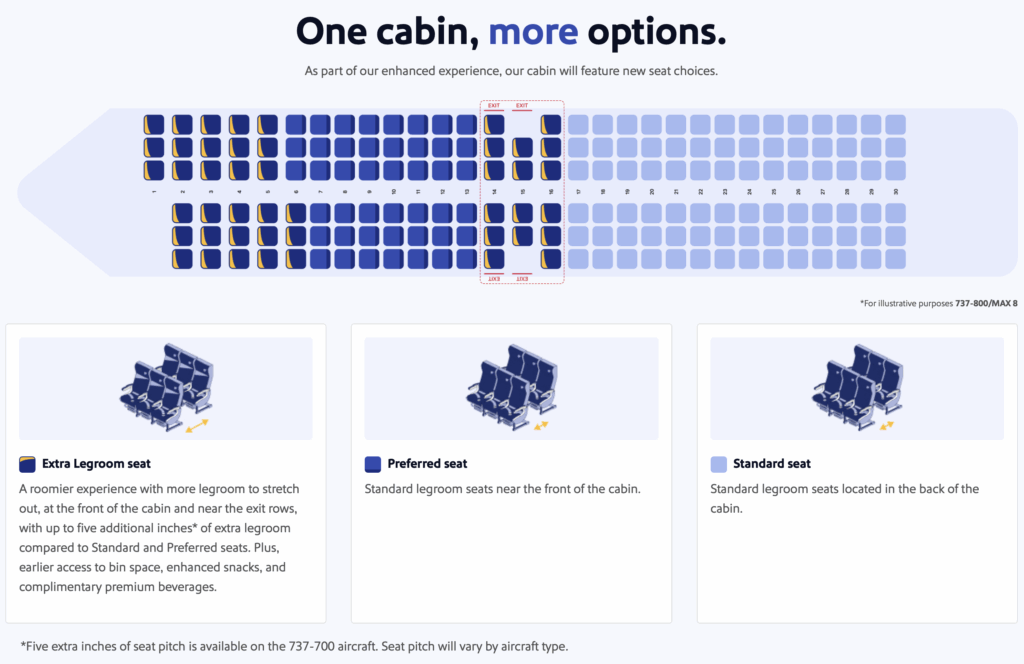
Beyond seat categories, when you can select a seat depends on your fare, elite status, and/or Southwest credit card benefits. Some travelers can select at booking, others within 48 hours of departure, while Basic passengers without additional benefits receive an assigned Standard seat at check-in.
| Standard (assigned at check-in) | Standard (select at booking) | Preferred (or any Standard seat) | Extra Legroom (or any seat) |
|
|---|---|---|---|---|
| Basic fare | ✔️ | |||
| Choice fare | ✔️ | |||
| Choice Preferred fare | ✔️ | ✔️ | ||
| Choice Extra fare | ✔️ | ✔️ | ✔️ | |
| A-List | ✔️ | ✔️ | Within 48 hours of departure on any fare, when available. | |
| A-List Preferred | ✔️ | ✔️ | ||
| Southwest Rapid Rewards® Plus Credit Card and Southwest Rapid Rewards Plus Business Credit Card | Within 48 hours of departure on any fare, when available. | |||
| Southwest Rapid Rewards® Premier Credit Card and Southwest® Rapid Rewards® Premier Business Credit Card | Within 48 hours of departure on any fare, when available. | Within 48 hours of departure on any fare, when available. | ||
| Southwest Rapid Rewards® Priority Credit Card and Southwest® Rapid Rewards® Performance Business Credit Card | ✔️ | ✔️ | Within 48 hours of departure on any fare, when available. |
The first factor is fare. Generally, the pricier the fare, the better your seat selection benefit. Basic fares do not include seat selection, and a Standard seat is assigned at check-in or at the gate.
If you do not have status or a Southwest credit card, your seat selection depends on your fare or whether you decide to pay extra for a seat.
If you do have Southwest status or a credit card, your seat options expand and may affect your decision on which fare to purchase. For example, if you have A-List status or carry any of the following:

- Earn 60,000 bonus points after spending $2,000 on purchases in the first 3 months from account opening.
- 7,500 anniversary points each year.
- Earn 4 points per $1 spent on Southwest Airlines® purchases, including flights, inflight, and Southwest gift cards.
- Earn 2 points for every $1 you spend at gas stations and restaurants
- First checked bag free for Cardmembers and up to 8 additional passengers in the same reservation.
- Select a Preferred seat at booking, at no additional charge, when available.
- Cardmembers and up to 8 passengers in the same reservation will board with Group 5 giving them earlier access to overhead bins.
- No foreign transaction fees.
- Member FDIC
- 4X points per $1 spent on all Southwest® purchases
- 2X points per $1 spent at gas stations and restaurants
- 1X point per $1 spent on all other purchases

- Earn 80,000 points after you spend $5,000 on purchases in the first 3 months from account opening.
- 9,000 bonus points after your Cardmember anniversary.
- Earn 4X pts on Southwest® purchases.
- Earn 2 points for every $1 you spend at gas stations and restaurants
- Earn 2X points on hotel accommodations booked directly with the hotel
- Earn 2X points on local transit and commuting, including rideshare.
- First checked bag free for Cardmembers and up to 8 additional passengers in the same reservation.
- Cardmembers and up to 8 passengers in the same reservation will board with Group 5 giving them earlier access to overhead bins.
- Member FDIC
- 4X points per $1 spent on Southwest® purchases
- 2X points per $1 spent at gas stations and restaurants
- 2X points per $1 on hotel accommodations booked directly with the hotel
- 2X points per $1 spent on rideshare
- 1X point per $1 spent on all other purchases
You could purchase a Basic fare and still select a Preferred seat at booking. While Basic fares include other restrictions, this benefit allows you to save points or cash by booking the lowest fare and still select a seat without paying extra.
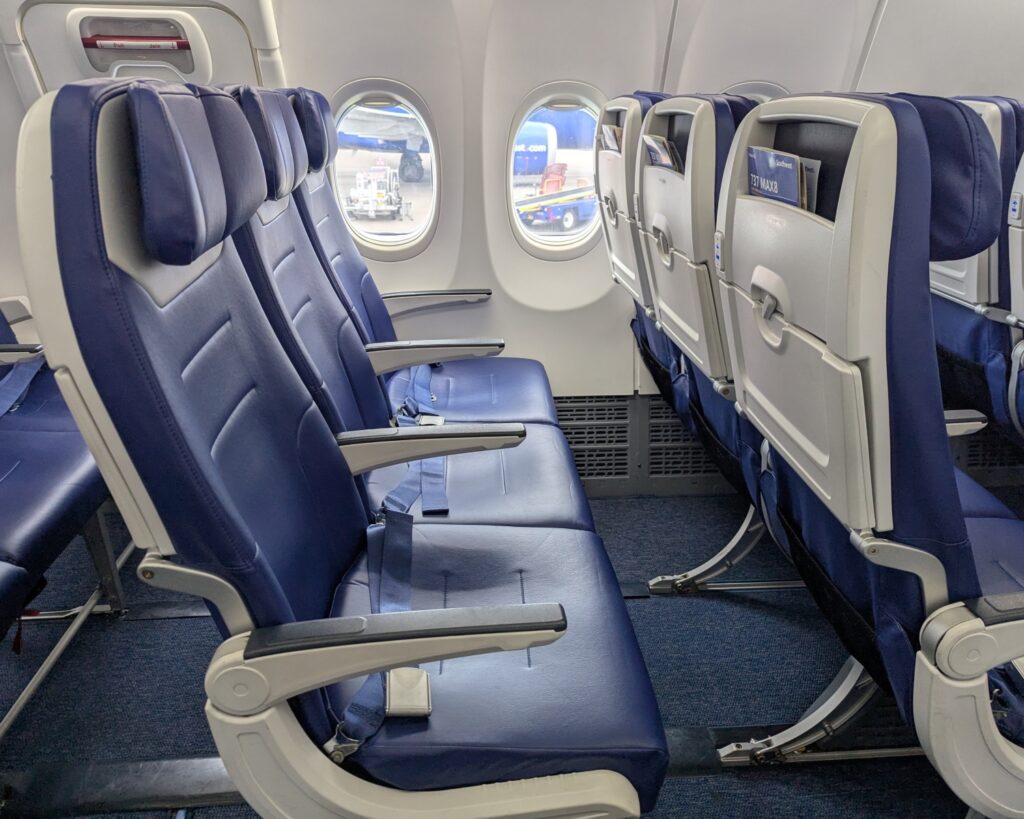
What Does It Cost To Pick a Seat on Southwest?
If you do not have status or a Southwest credit card, or if you want to move into a higher seat category, there are a few things to consider. We'll look at a couple of routes to compare both seat prices and fare differences as they relate to seat selection.
Example: Chicago (MDW) to Pittsburgh (PIT)
On a sample route from Chicago (MDW) to Pittsburgh (PIT), here's what pricing looks like:
- $197 or 15,000 points for Basic
- An additional $35 or 3,000 points for Choice (includes a Standard seat at booking)
- An additional $105 or 8,500 points for Choice Preferred (includes a Preferred seat at booking)
- An additional $145 or 11,500 points for Choice Extra (includes an Extra Legroom seat at booking)
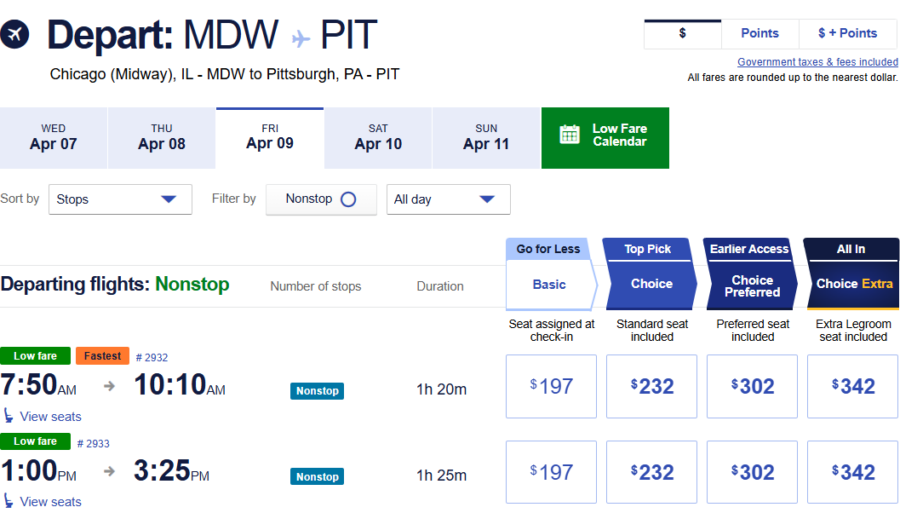
If you buy a Basic fare and decide to upgrade your seat later, here's what the options look like. Standard seats are $18–$22, Preferred seats typically cost $29 to $32, while Extra Legroom seats range from $47–$53.
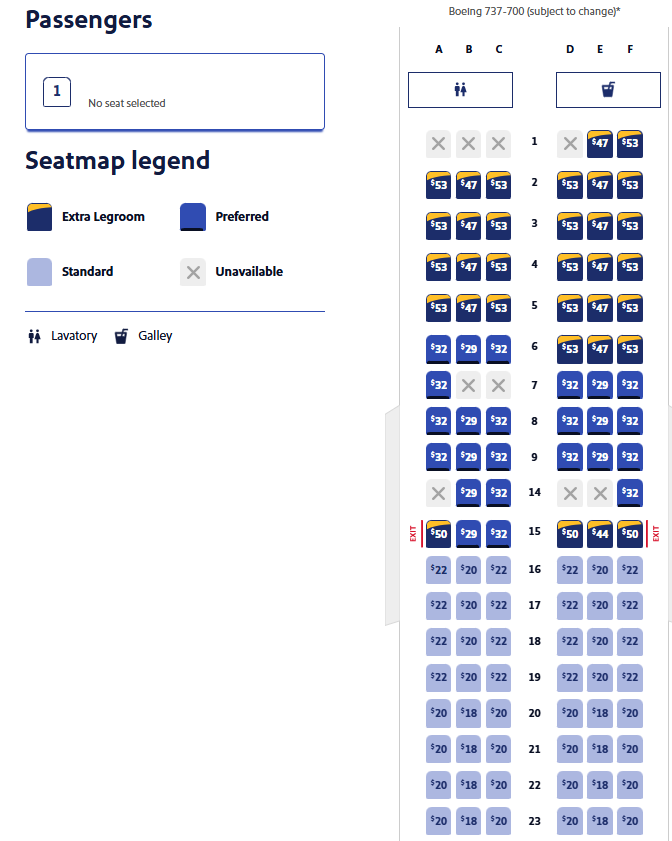
Seat selection is just one difference between fare types. Boarding position, refundability, expiration of flight credits, and how many Rapid Rewards points you earn also vary. By fare alone, free checked bags are not included until Choice Extra.
For seat selection alone, it might make sense to book a Basic fare and purchase a seat separately. For this flight, you could pay $197 for a Basic fare and $29–$32 for a Preferred seat, compared to $302 for the Choice Preferred fare that includes the same seat. Or, you could pay $35 more and lock in a Standard seat at booking with the Choice fare, instead of receiving a random seat at check-in.
The best option depends on the value of the full bundle of fare benefits, so compare the full package before deciding.
Example: Orlando (MCO) to Los Angeles (LAX)
Now let’s look at a longer route from Orlando (MCO) to Los Angeles (LAX), where fare differences and award prices are higher.
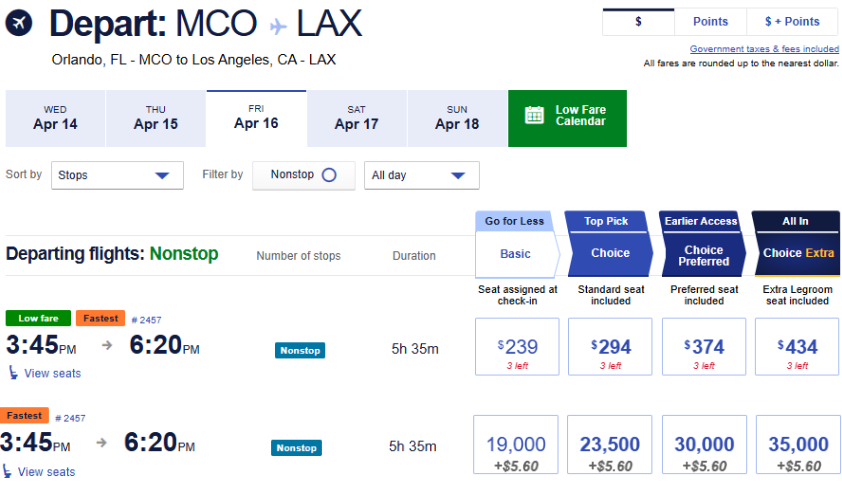
The prices for seats are also higher on the longer flight. On a Basic fare:
- Standard: $31 to $34
- Preferred: $41 to $46
- Extra Legroom: $76 to $88
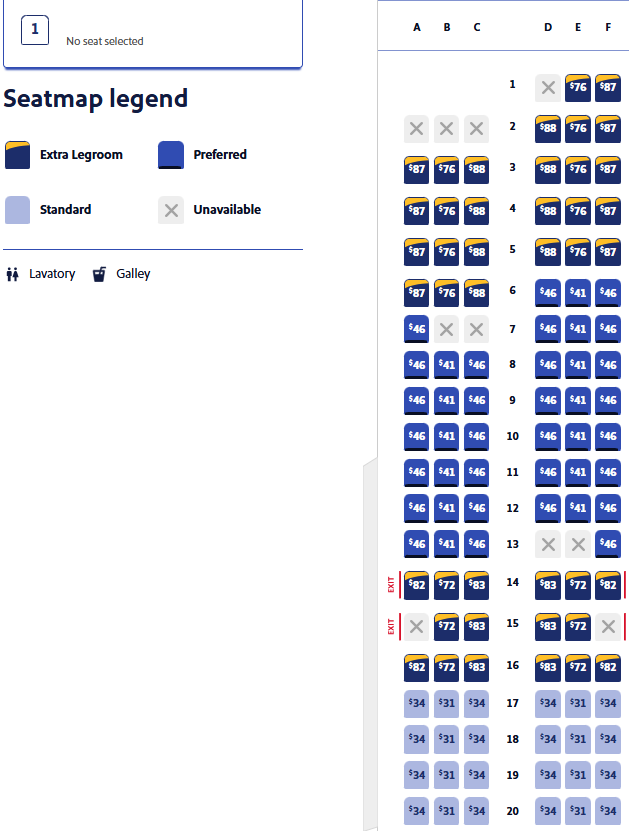
On this longer flight, it may make more sense to book a Choice fare that includes a Standard seat for $55 more, rather than paying $31 to $34 for the seat on its own. The Choice fare also comes with other benefits over Basic, including a better boarding position and a transferable flight credit if you cancel.
It's clear that longer flights have wider price gaps between fares and higher seat costs overall. Keep in mind that seats are priced per segment.
Best practices for connecting flights
So, for a connecting flight like Minneapolis (MSP) to New Orleans (MSY), you would need to purchase a seat for each segment to select your spot in advance. In cases like this, paying for a higher fare with seat selection included may be the better value.
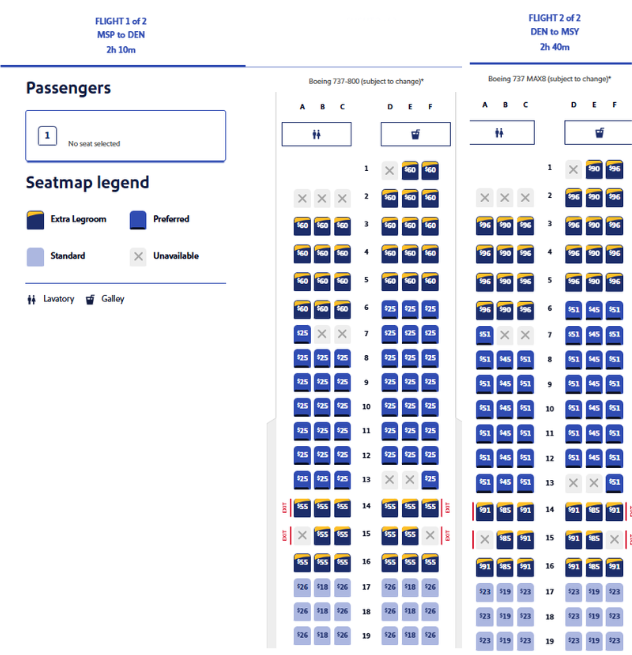
The dynamic nature of seat pricing, along with the complex fare structure, makes a strong case for earning Southwest status or holding a Southwest credit card to avoid these fees. And that's undoubtedly what Southwest had in mind when it envisioned these policy changes.
Since the seat benefit from your card or status extends to up to eight additional people on the same reservation, the savings can add up quickly if you fly Southwest often.
How To Book and Make Seat Selections on Southwest
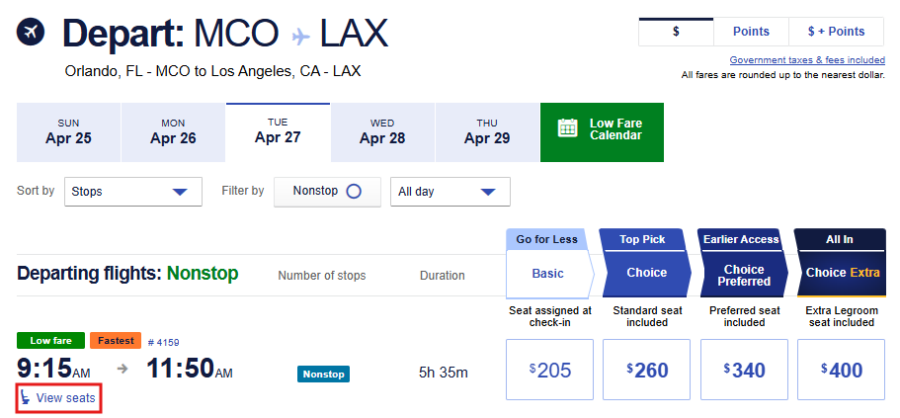
The seat selection process is relatively straightforward. When you search for flights, you will now see a “View seats” link that shows available seat options on the flight. This view does not display seat prices, though.
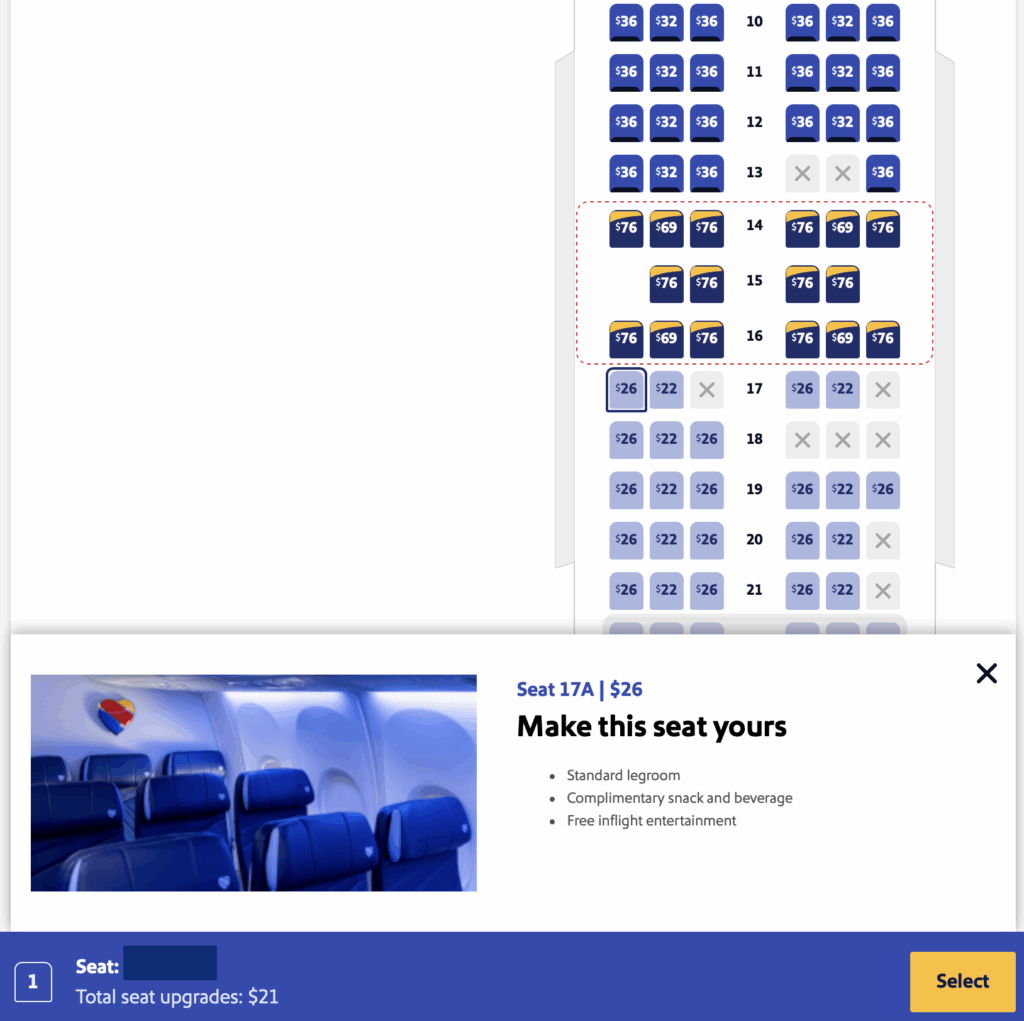
After selecting your flight and entering passenger information, you can choose an available seat and pay to upgrade your seat if needed.
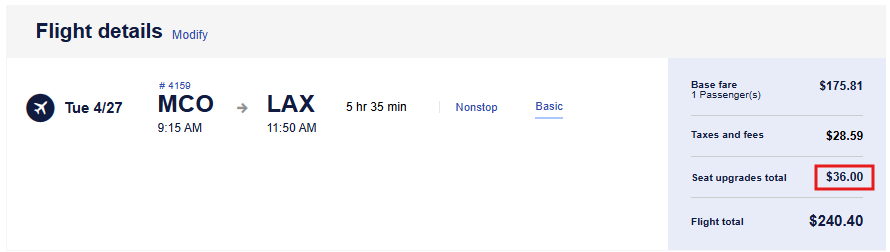
On the final screen, you will see the total cost for any seat upgrades. Refund and exchange policies for seat purchases vary depending on the situation, so make sure to review the terms before confirming your purchase. You can find those details here.
Seat selection with elite status or a co-branded credit card
If you have Southwest elite status or a co-branded credit card, the booking process remains the same, but your seat selection options will reflect your benefits. Once logged in, if you choose a Basic fare, a drop-down box will display the seating and other benefits associated with your status or card.
For example, as a Southwest® Rapid Rewards® Performance Business Credit Card (Rates & Fees) cardholder, I am eligible to select a Preferred seat at booking.
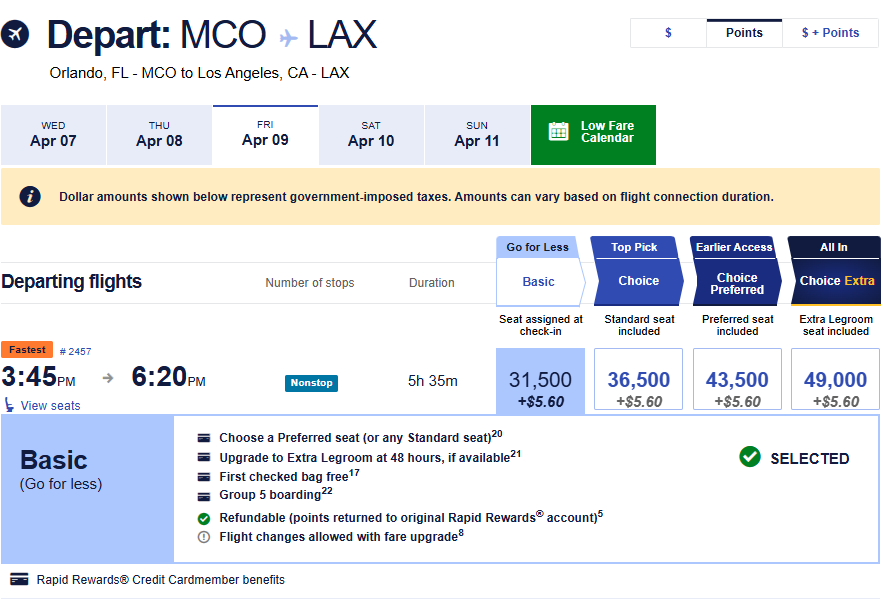
When I reach the seat selection screen, I can choose a Preferred seat at no cost. Extra Legroom seats still require a fee. Only travelers booking Choice Extra fares or those with A-List Preferred status can select Extra Legroom seats for free at booking.
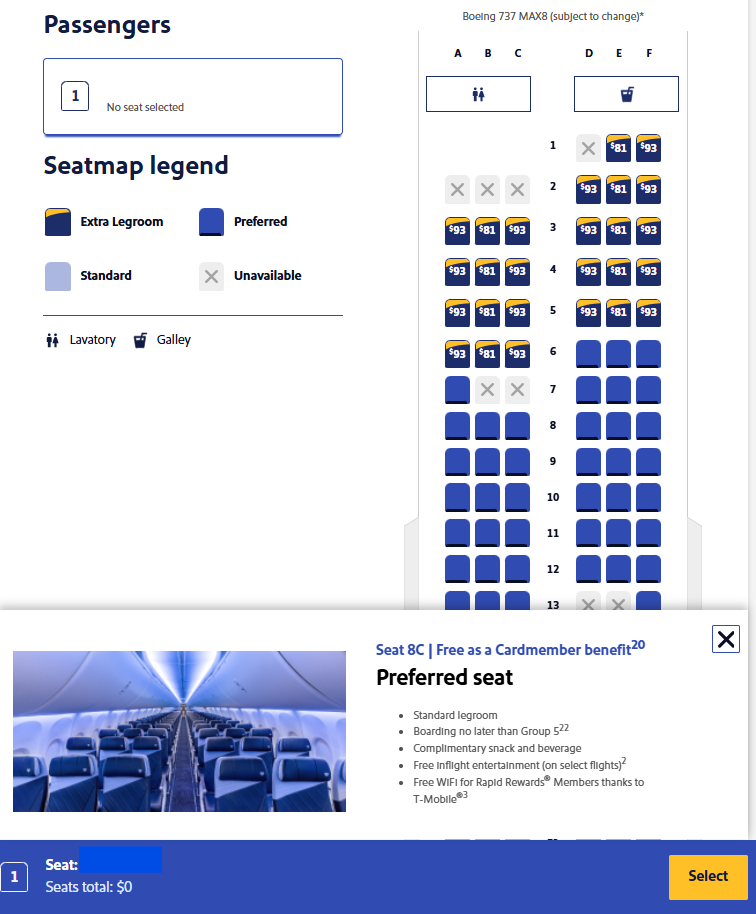
It's also worth noting that you do not need to use your Southwest credit card to pay for the booking to receive the benefit. Simply having the card is enough for the seating perks to apply.
Unique Scenarios To Consider With Southwest’s Assigned Seating
There's a lot to digest here. Deciding which fare to purchase and when to buy a seat is subjective and should be evaluated on a flight-by-flight basis. In general, if seat selection is important to you, travelers without status or a Southwest credit card may want to consider booking at least a Choice fare.
Those with Rapid Rewards status or a co-branded credit card may be able to stick with Basic fares and use their benefits for seat selection, earlier boarding, and checked bag savings.
Another factor to weigh is whether you are paying with points or cash. One of the biggest drawbacks to Basic fares is that a flight credit from a canceled ticket is only valid for six months from the date of booking. That can be a significant downside when paying with cash. However, with award tickets, the points are simply redeposited into your account, so the restriction is much less of a concern when booking with points.
All that being said, some booking situations are less straightforward. Here's how to handle them.
Related: Southwest Airlines Checked Bag Fees: What You’ll Pay — and How To Avoid Them
What about Companion Pass holders?
Luckily, Companion Pass holders can extend their seating benefits to companions flying on the pass, even though the companion is on a separate reservation. The booking process is slightly different but still efficient. After the Companion Pass holder books their own flight, they can go into their reservation and click “Add Companion.”
Related: How To Select Your Companion and Use Your New Southwest Companion Pass
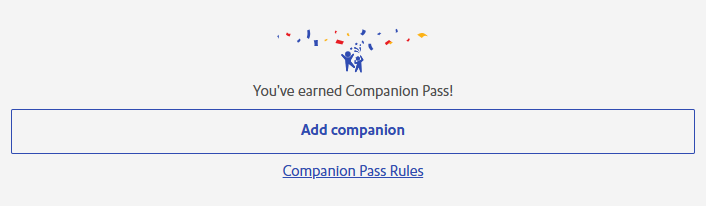
Once the companion's passenger details are confirmed, the system will direct you to the seat selection screen. At this point, the original member’s benefits will apply to the companion as well.
In the example below, a Southwest Performance Business Card cardholder is able to select Preferred or Standard seats for their companion at no additional cost. One thing to keep in mind is that the seat map does not indicate where the original passenger is seated. Only unavailable seats are marked, so you will need to remember or double-check your seat assignment to seat your companion next to you.
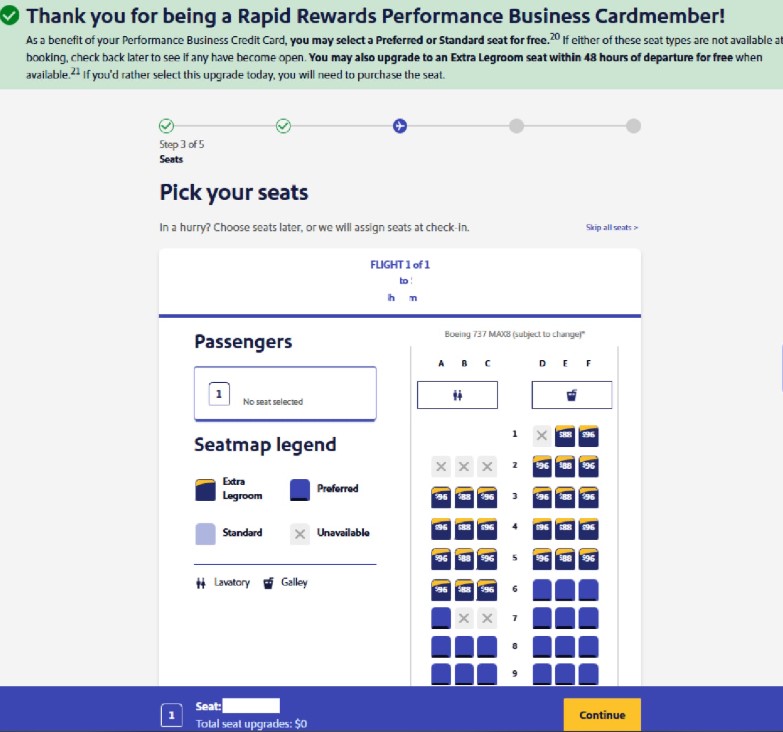
If you add your companion immediately after booking your own flight, you will likely find an available seat nearby. But what happens if you add the companion later, especially closer to the flight date? The odds of sitting together may drop significantly.
What about booking from another account?
Credit card seat benefits are tied to the Rapid Rewards member who holds the card. If another member uses their points to book your flight, skip seat selection and enter each passenger’s Rapid Rewards number. Then, log in to the account of the passenger with seat benefits and select seats for free.
The same process works if a passenger with seat benefits is the designated companion for a Companion Pass holder with no benefits. Book the original ticket, add the companion, then select seats through the companion’s account. After that, the Companion Pass holder should also be able to select a seat for free using the companion’s benefits.
A note about canceled seat fees
Southwest's current terms state that if you cancel a flight for which you also paid a seat fee, the seat fee becomes a flight credit but cannot be used again for new seat selections. So, if you cancel and rebook a reservation to get a lower fare, you'll need to pay for the seat again.
What about minors on a separate reservation?
There are several reasons you may want to split passengers across multiple reservations, such as buying some tickets with cash and others with points. If you do this with adults, the cardmember's seating benefits do not extend to passengers on a separate reservation.
But when booking for minors under 12, Southwest requires you to “link” their reservation to a traveling adult unless you are paying for an Unaccompanied Minor. You might expect linking a minor's reservation to an adult cardholder to extend the seating benefits, but reports suggest it does not.
That can make creative booking strategies harder for families. Separate reservations may require buying a higher fare or taking your chances with Southwest’s assigned seating.
What does the 48-hour upgrade look like?
Certain statuses and
You’ll want to act quickly at the 48-hour mark, as eligible seats can go fast. If you have separate reservations, such as when using a Companion Pass, you’ll need to upgrade each reservation separately. That means your group could be split up or there may not be enough eligible seats for everyone. For connecting itineraries, you’ll also need to upgrade each segment separately at the 48-hour mark.
Bottom Line
Southwest’s assigned seating system adds another cost to consider when booking. Your fare type, elite status, and credit card benefits can determine whether you pay for a seat or get one included.
If seat selection matters to you, compare the cost of paying separately with the price of a higher fare type. Frequent Southwest flyers may also be able to avoid these fees with elite status or the right credit card.
For rates and fees of the cards mentioned in this post, please visit the following links: Southwest Rapid Rewards® Priority Credit Card (Rates & Fees), and Southwest® Rapid Rewards® Performance Business Credit Card (Rates & Fees)