





AwardWallet receives compensation from advertising partners for links on the blog. The opinions expressed here are our own and have not been reviewed, provided, or approved by any bank advertiser. Here's our complete list of Advertisers. Offers for Bank of America cards mentioned in this post have been updated as of 10/01/2026
Offers for the Atmos™
I'll admit: I'm a bit of a nerd. Maybe it's from working as a tax accountant for a decade. Maybe I was just born this way. But, I check every credit card transaction even as my wife and I travel the world as full-time digital nomads.
On a recent trip to South Africa, we booked Airlink flights from Johannesburg (JNB) to Skukuza (SKZ) to visit Kruger National Park. That purchase posted to my credit card around $22 higher than I expected. But it wasn't an error, and the purchase posted exactly as it was supposed to — once I referenced the right tool.
Whether you're planning a large foreign purchase or are just curious how it works, here's what to know about how foreign credit card purchases are converted.
Basics of How Much Your Foreign Card Purchase Will Cost
First, remember to always use local currency when making a foreign transaction. If you see an option to pay in your home currency (e.g., U.S. Dollars), ignore that option. That price is likely determined using Dynamic Currency Conversion (DCC) — and it's always a bad deal. Although there's some ease in knowing the purchase price in your home currency, it's cheaper if you pay in the local currency.
To convert that local currency price to your home currency, you might assume it's as simple as multiplying the price by the current exchange rate using Google or a currency converter. While that will give you a rough idea of how much you'll pay for the purchase, the charge on your credit card statement is likely to be different — potentially significantly, like in my case.
The exact exchange rate used depends on the kind of card you have. Thankfully, both Visa and
Visa Foreign Exchange Rate Calculator
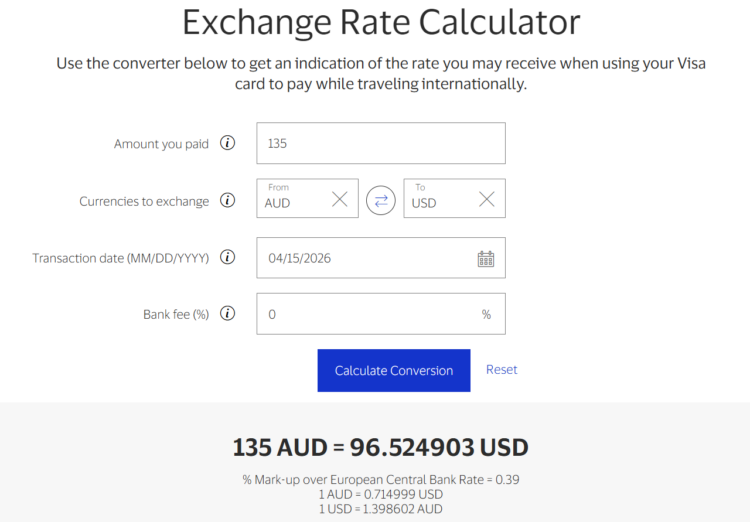
If you plan to pay using a Visa card, use Visa's Exchange Rate Calculator to see exactly how much your purchase will cost you.
To use this tool, enter the purchase amount in the foreign currency, then select the foreign currency and your home currency. Enter the transaction date — either today if you're about to make a purchase, or a past date if you want to see how a past purchase will post.
If your card charges a foreign exchange fee, you can enter that fee in this calculator. If you have a credit card with no foreign transaction fees, set the bank fee to 0%.
Finally, click on “Calculate Conversion” to see the charge that should post to your credit card.
For example, here's how a 135 Australian Dollar purchase on April 15, 2026 would convert to U.S. dollars:
Mastercard Foreign Exchange Rate Calculator
Like Visa, Mastercard publishes a Currency Exchange Rate Converter to convert foreign purchases. It works quite similarly. Just enter the foreign currency code, transaction amount, your card's currency, any applicable bank fee, and the date of the transaction. Then, click “Calculate” to see what the cost would be in your home currency.
One notable limitation is that you can't enter today's date. That means you won't be able to tell exactly what a purchase will cost before using a Mastercard.
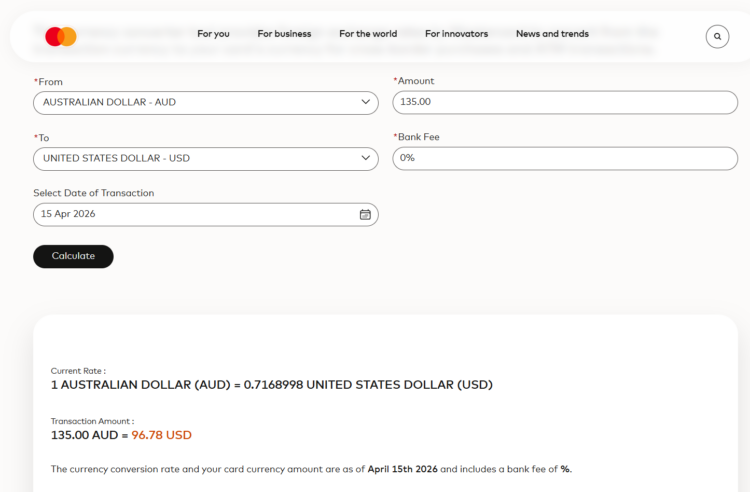
Here's the same example as what I used above for the Visa example: 135 Australian Dollars to U.S. dollars for a purchase on April 15, 2026:
So, What Happened With My Purchase?
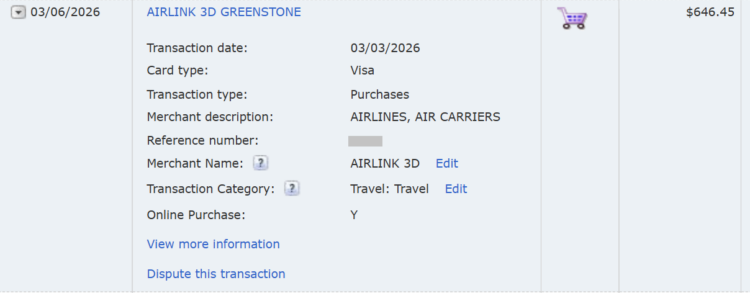
The purchase that started me down this rabbit hole was an Airlink flight purchase costing 10,335.92 South African rand. Based on the exchange rate on Google at the time we priced out this purchase, my wife and I expected the purchase to cost around $624.71. Instead, it posted to my statement at $646.45.
This $21.74 was enough of a difference that I'd assumed that Airlink must have used Dynamic Currency Conversion — and I was ready to file a claim for the difference. It didn't help that the Bank of America transaction listing only shows the U.S. dollar cost, not the ZAR cost. (Note that the ZAR cost showed up on my statement once my billing cycle closed.)
When I converted the ZAR cost to USD using the foreign exchange rate tool Oanda, it showed that the purchase should've cost $625.21:
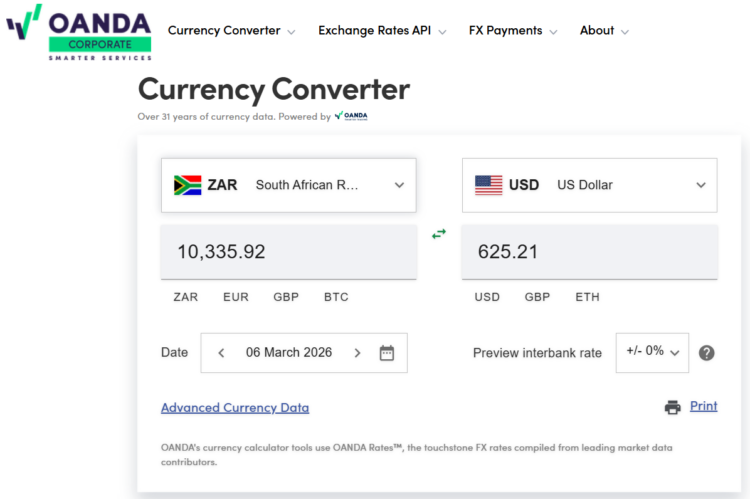
But unfortunately for us, the South African rand was going through a period of quick devaluation against the dollar. So, even a few-day difference between the purchase date (March 3) and posting date (March 6) accounted for much of the difference.
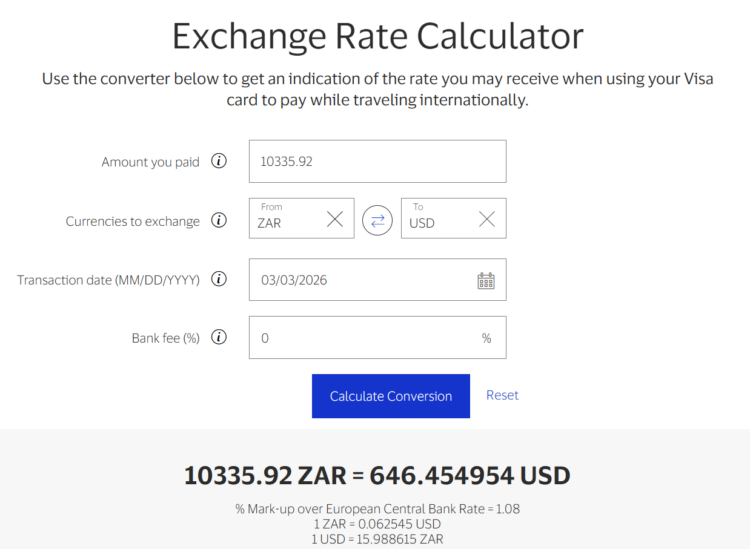
Sure enough, when I plugged in the actual purchase date into Visa's Exchange Rate Calculator, the result was exactly what posted to my credit card statement: $646.45.
Is Visa or Mastercard Better for Overseas Purchases?
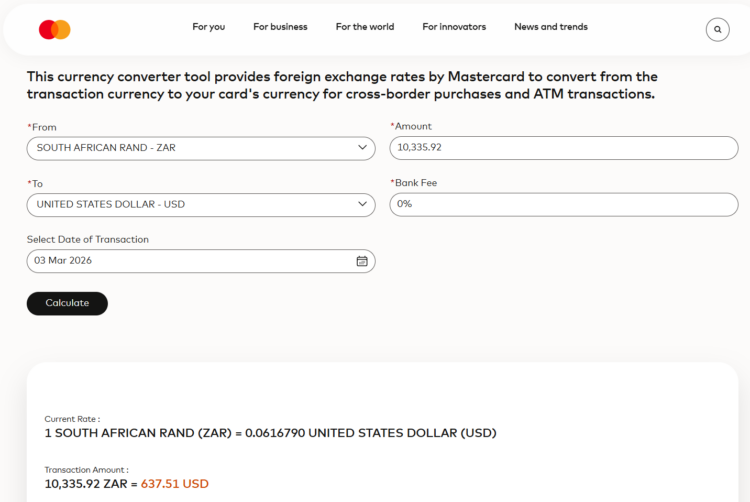
In my case, I'd have saved around $9 if I'd used a Mastercard instead of a Visa for this purchase. Based on the Mastercard Currency Exchange Rate Converter, a 10,335.92 rand purchase on March 3, 2026 would have been charged as $637.51.
However, Mastercard doesn't always provide a better exchange rate.
I randomly generated seven possible international purchases. Then I plugged those into both Visa and Mastercard's converters. Here's how they compare:
| Purchase Amount | Currency | Date | Visa | Mastercard | Cheaper Option (difference) |
|---|---|---|---|---|---|
| 3.5 | euro | 3/15/2026 | 4.04 | 4.04 | No difference |
| 1200 | Japanese yen | 4/2/2026 | 7.58 | 7.57 | Mastercard (0.13%) |
| 18.75 | British pounds | 1/10/2026 | 25.23 | 25.23 | No difference |
| 9.5 | Canadian dollars | 2/22/2026 | 6.95 | 6.95 | No difference |
| 45 | Australian dollars | 1/8/2026 | 30.46 | 30.31 | Mastercard (0.49%) |
| 2800 | Thai baht | 3/19/2026 | 86.93 | 86.02 | Mastercard (1.04%) |
| 95 | Brazilian reais | 1/27/2026 | 18.06 | 18.25 | Visa (1.04%) |
In these examples, the conversions are essentially the same for most major currencies. The Australian Dollar difference is perhaps the biggest surprise, but it's still a relatively small amount.
For more volatile currencies — like Thai baht and Brazilian reais — there can be larger differences. Still, the difference is likely immaterial for most travel purchases.
Best Cards for Overseas Purchases
While we're on the topic of overseas purchases, let's discuss which card you should pack for your next trip. Of course, you'll want to use a card that charges no foreign transaction fees. Thankfully, that's a feature on many travel cards.
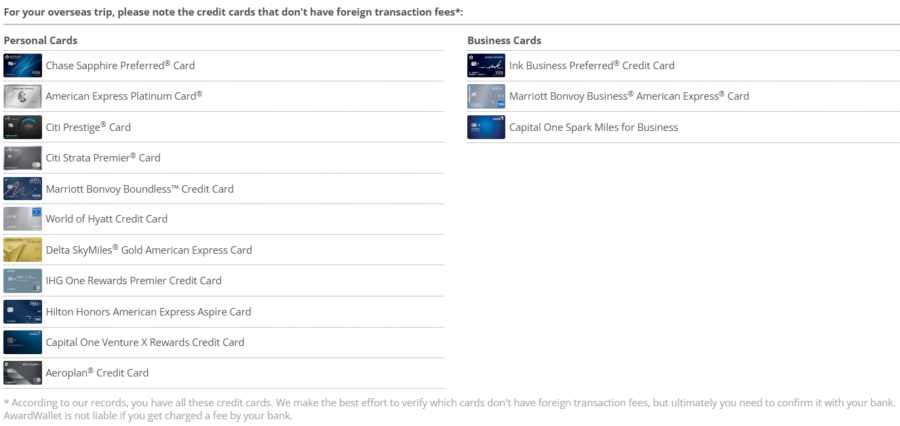
Not sure which of your cards have no foreign transaction fees? If you've linked your bank accounts to AwardWallet, you'll see a list of which of your cards have this feature whenever you book an overseas trip:
Track all of your travel plans, including flights, hotels, rental cars, events, and more through AwardWallet. Sign up for free and get three free months of AwardWallet Plus!
Hands down, the best option to use is the Atmos™ Rewards Summit Visa Infinite® credit card. This card earns 3 Alaska points per dollar spent on all foreign purchases. Especially when you factor in the value of Alaska points, this card simply can't be beat for overseas purchases.
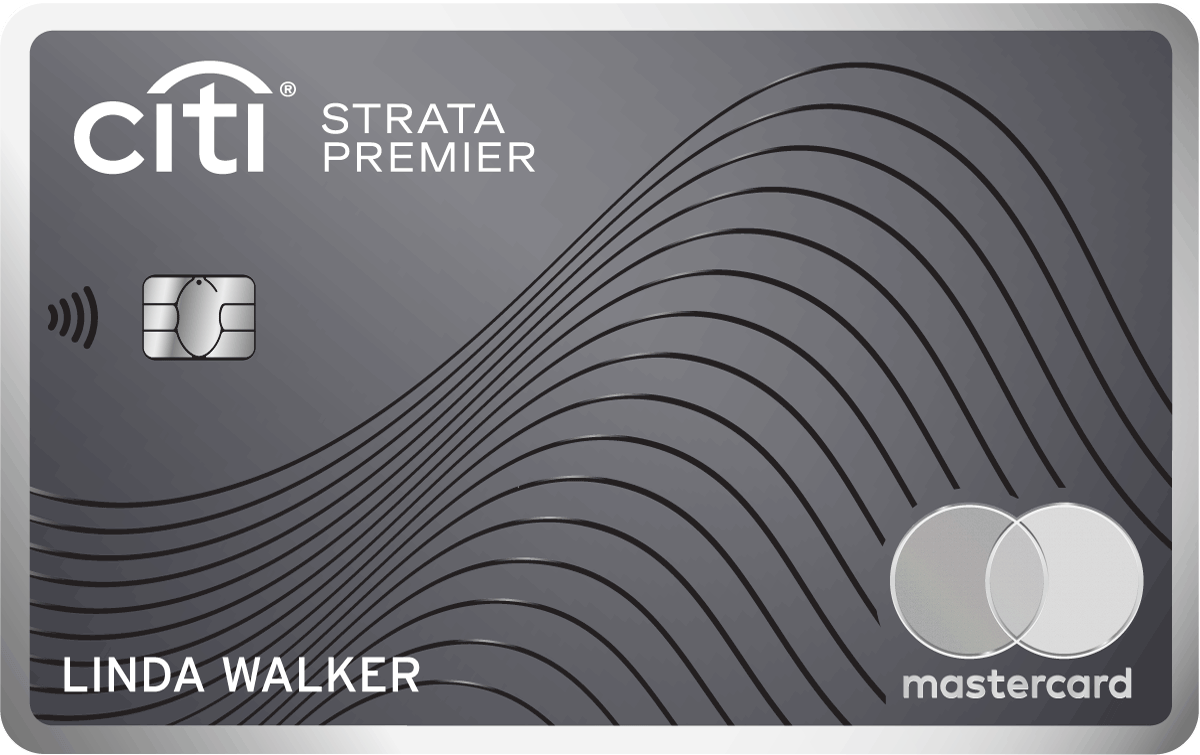
Otherwise, the best card to use depends on the type of purchase you're making. If you're buying groceries or filling your rental car tank, that might be the Citi Strata Premier® Card (Rates & Fees).
- Earn 60,000 bonus ThankYou® Points after spending $4,000 in the first 3 months of account opening, redeemable for $600 in gift cards or travel rewards at thankyou.com.
- Earn 10 Points per $1 spent on Hotels, Car Rentals, and Attractions booked on CitiTravel.com.
- Earn 3 Points per $1 on Air Travel and Other Hotel Purchases, at Restaurants, Supermarkets, Gas and EV Charging Stations.
- Earn 1 Point per $1 spent on all other purchases
- $100 Annual Hotel Benefit: Once per calendar year, enjoy $100 off a single hotel stay of $500 or more (excluding taxes and fees) when booked through CitiTravel.com. Benefit applied instantly at time of booking.
- No expiration and no limit to the amount of points you can earn with this card
- No Foreign Transaction Fees on purchases
- 10X on Hotels, Car Rentals, and Attractions booked through CitiTravel.com
- 3X – Earn 3 Points per $1 spent on Air Travel and Other Hotel Purchases
- 3X – Earn 3 Points per $1 spent on Restaurants
- 3X – Earn 3 Points per $1 spent on Supermarkets
- 3X – Earn 3 Points per $1 spent on Gas and EV Charging Stations
- 1X – Earn 1 Point per $1 spent on All Other Purchases
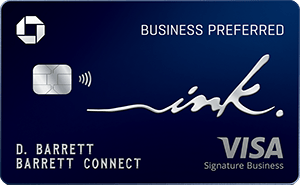
Or, that could be pulling out my favorite travel card for general travel purchases.
- Earn 100k bonus points after you spend $8,000 on purchases in the first 3 months from account opening.
- Earn 3 points per $1 on the first $150,000 spent on travel and select business categories each account anniversary year. Earn 1 point per $1 on all other purchases
- Earn 5x total points on Lyft rides through 9/30/27.
- With Zero Liability you won't be held responsible for unauthorized charges made with your card or account information.
- Redeem points for cash back, gift cards, travel and more - your points don't expire as long as your account is open
- Go further when you book with Chase Travel℠. Enjoy competitive rates, seamless booking and premium benefits.
- Purchase Protection covers your new purchases for 120 days against damage or theft up to $10,000 per claim and $50,000 per account.
- Receive complimentary access to DashPass by DoorDash.
- Member FDIC
- 3X points per $1 on the first $150,000 spent in combined purchases on travel, shipping purchases, Internet, cable and phone services, advertising purchases made with social media sites and search engines each account anniversary year
- 1X point per $1 on all other purchases
Here's our reference guide on the best card for each bonus spending category. Just note that many Amex bonus categories are only applicable to purchases in the United States. So, check your card's terms for these limitations.
Related: 8 Tips for Saving Money While Traveling Internationally
Bottom Line
Calculating how much a foreign purchase will cost isn't as simple as plugging the purchase amount into a currency converter. But that's not a bad starting point. While the final purchase might vary a bit, it's unlikely to be worth your time to pull up Visa and/or Mastercard's currency converter tools to calculate the exact purchase amount — at least for most travel purchases.
However, if you're making a significant overseas purchase with a credit card, it could be worth a couple of minutes to use these calculators to see which payment network offers a better rate.
For rates and fees of the cards mentioned in this post, please visit the following links: Citi Strata Premier® Card (Rates & Fees), and Ink Business Preferred® Credit Card (Rates & Fees)