





AwardWallet receives compensation from advertising partners for links on the blog. The opinions expressed here are our own and have not been reviewed, provided, or approved by any bank advertiser. Here's our complete list of Advertisers.
Nothing sucks the fun out of travel like logging into nine different airline websites to find an award flight. Several award search tools have arisen over the past few years, promising to help you identify high-value award redemptions efficiently and easily.
Point.me is probably the best-known of these tools. Members can search for flights across dozens of different airline programs and compare booking methods in real time. Does it make more sense to pay cash, transfer
Point.me has recently gotten major upgrades that put it leaps and bounds ahead of the competition. It's drastically reduced search times, completely overhauled its Explore tool, and introduced a ton of new functionality to make it easier to utilize than ever.
Here's everything to know about Point.me and how to use it.
What Is Point.me?
Point.me bills itself as “a better way to book with points.” The tool takes basic trip details such as origin, destination, and flight date and figures out how you can use points and miles to get there.
Point.me membership options
Point.me offers award travelers several different membership options, allowing users to purchase access up to a full year at once. If you want to use Point.me, you have to subscribe.
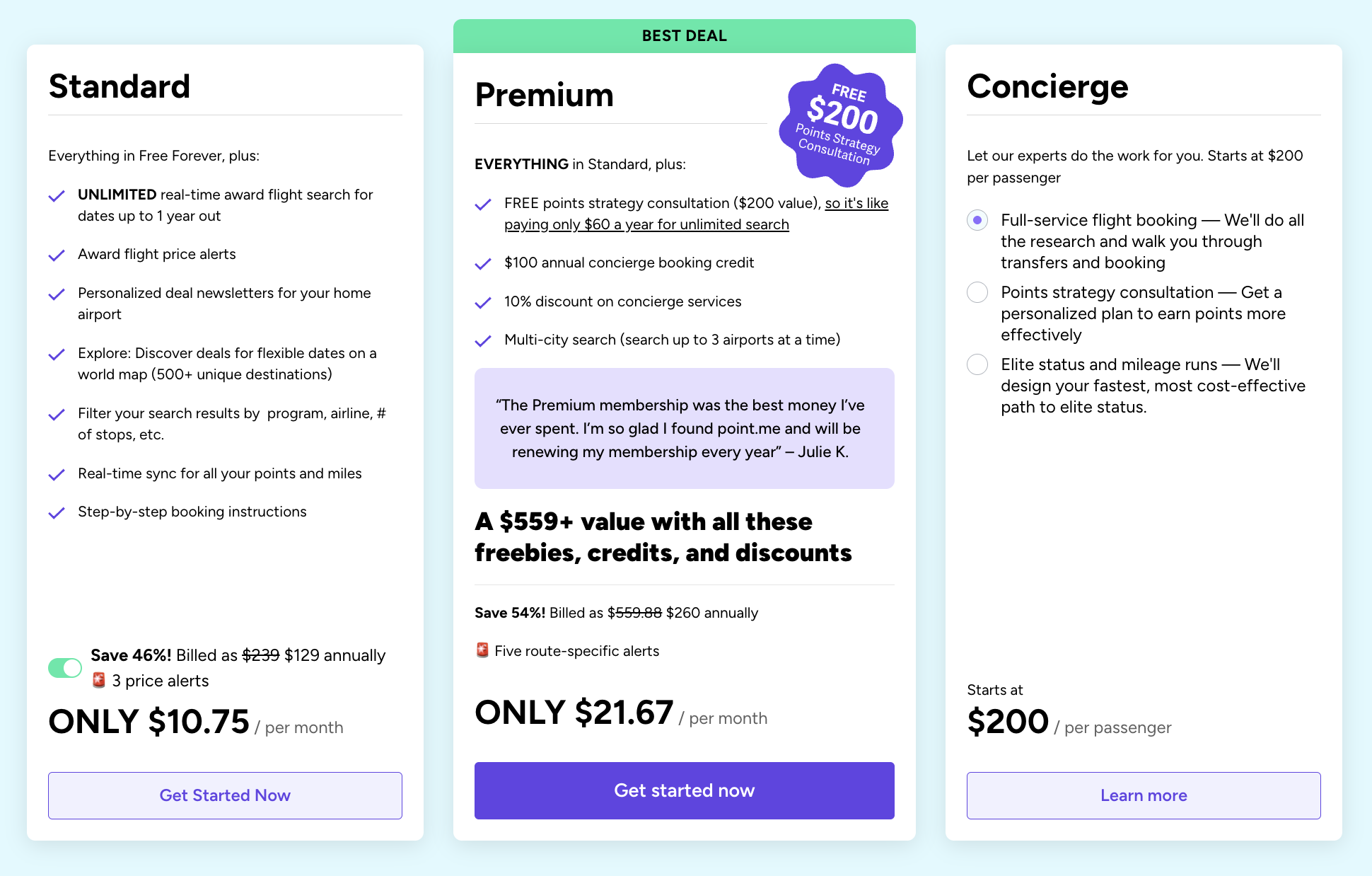
Luckily, it offers a free tier with basic functionality, along with two paid plans for even more features:
- Free Plan
- Search up to 60 days out with a limit of 15 results per search
- Access to the Point.me free weekly deals newsletter
- Access to Explore with up to 65 destinations
- Manual points tracking
- Standard Plan ($19.99/month or $129/year)
- Monthly plans receive one route-specific alert, and annual plans get three route-specific alerts
- Unlimited real-time award flight search for dates up to one year in advance
- Personalized deal newsletters for your home airport
- Access to Explore with up to 500+ unique destinations
- Filter your search results by program, airline, # of stops, etc.
- Real-time sync for all your points and miles
- Step-by-step booking instructions
- Premium Plan ($260/year)
- A free points strategy consultation ($200 value)
- $100 annual concierge booking credit
- 10% discount on concierge services
- Multi-city search (search up to 3 airports at a time)
- Five route-specific alerts
Use promo code AWARDWALLET4 to save 25% on an annual plan. That drops a full year of standard to $95.99 or a full year of premium to just $193.47.
American Express
If you have an American Express Membership
This is a great way to test out Point.me's functionality before committing to a membership. However, keep in mind that you'll only see availability with Amex transfer partners, even if you hold other transferable point currencies.

How To Use Point.me
Point.me is incredibly easy to use. It was built with travelers in mind, so it's not a complicated platform by any means. Here's a quick rundown of how to use Point.me's best features.
What programs does Point.me cover?
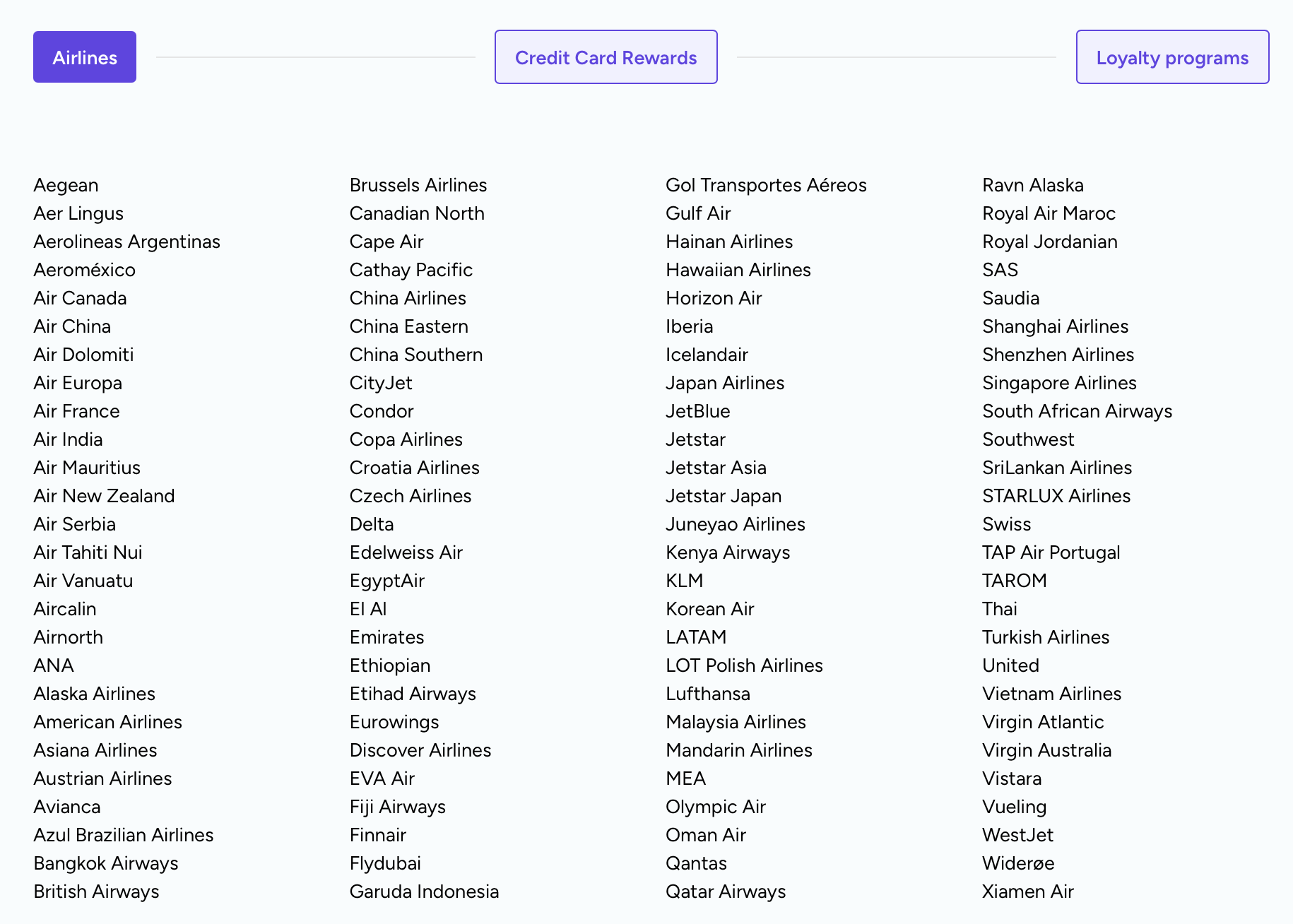
What makes Point.me so unique is that it offers more coverage than any of its competitors. You can search for flight awards on 150+ airlines through 30+
Here are the supported
- Aer Lingus AerClub
- Aeromexico Rewards
- Air Canada Aeroplan*
- Atmos Rewards
American Airlines AAdvantage - Asiana Airlines Asiana Club*
- avianca lifemiles
- Cathay Pacific Asia Miles
- Iberia Club
Delta SkyMiles - Emirates Skywards
- EVA Air Infinity MileageLands
- Flying Blue
- JetBlue TrueBlue
- Malaysia Airlines Enrich*
- Qatar Airways Privilege Club
- Qantas Frequent Flyer
- Singapore Airlines KrisFlyer
- Southwest
Rapid Rewards - TAP Miles&Go
- Thai Airways Royal Orchid Plus*
- The British Airways Club
- Turkish Miles&Smiles
United MileagePlus - Virgin Atlantic Flying Club
*These programs offer limited support.
And here are the supported credit card currencies:
- American Express Membership Rewards
- Bilt Points
- Brex
Capital One Chase Ultimate Rewards Citi ThankYou - Wells Fargo Rewards
In other words, if there's an award flight, you should be able to find it.
Getting set up
Although you can technically start searching as soon as you register for an account, you should do a few things to set up your profile so you can get the most out of Point.me.
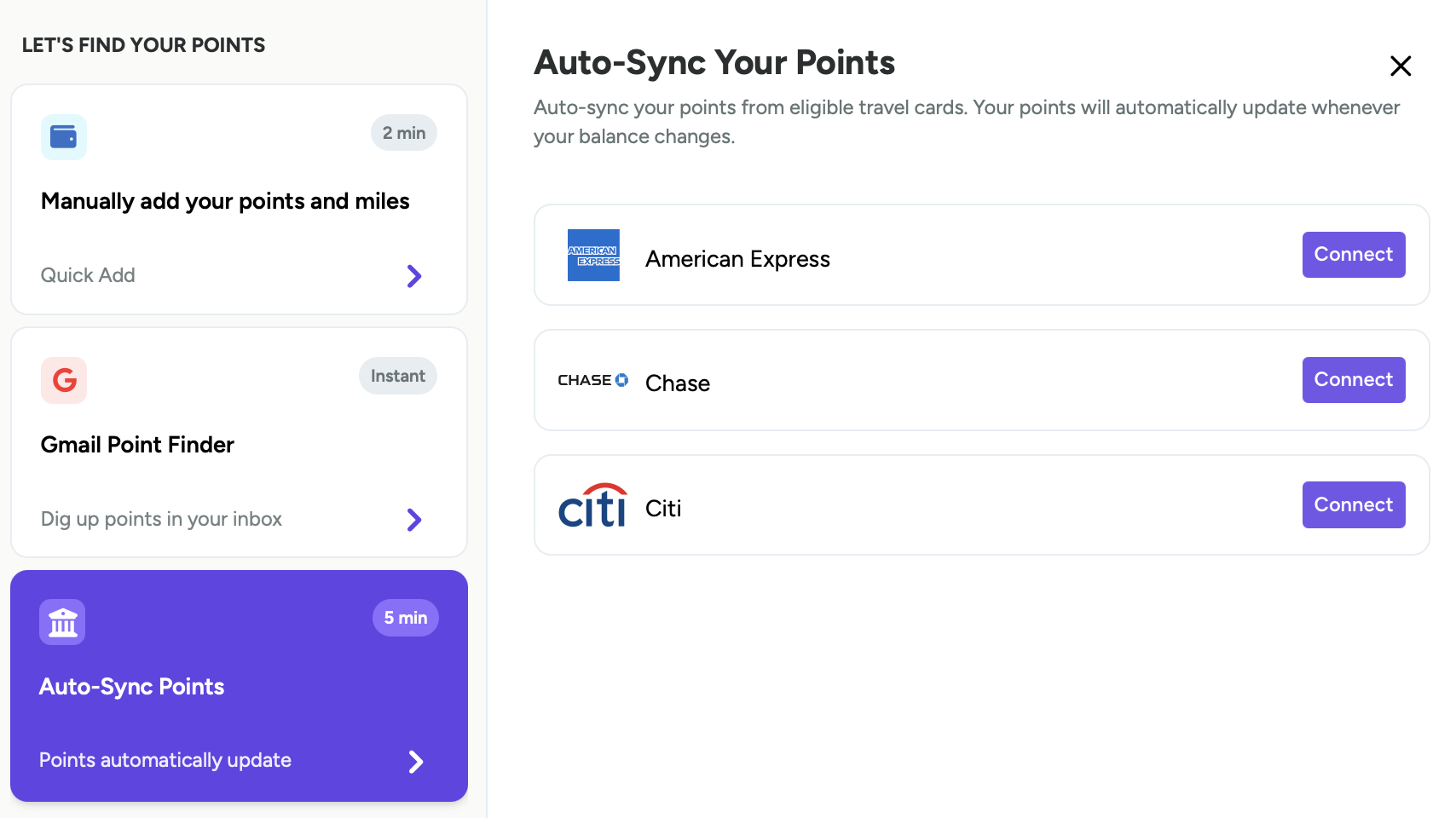
First, link your points and miles to your Point.me account, which will help when you're ready to search. You have three options to get your point balance shown in Point.me:
- Gmail point finder: When you give Point.me limited access to your email, it can identify point balances and add them to your Point.me profile.
- Auto-sync points: You can link your American Express, Chase, and Citi cards to Point.me, and it will auto-sync point balances from eligible cards. If you get an error message when trying to link your accounts on Safari, switch to Google Chrome.
- Manual add: Enter point balances for airlines, hotels, and
credit cards
Unfortunately, Point.me doesn't currently offer a way to sync your AwardWallet point balances. But this is functionality that we hope they will restore soon.
You should also fill out your traveler profile. You'll be asked the following questions:
- What’s your home airport?
- Where would you like to go?
- Which credit cards do you have?
This helps Point.me send you personalized recommendations.
Search
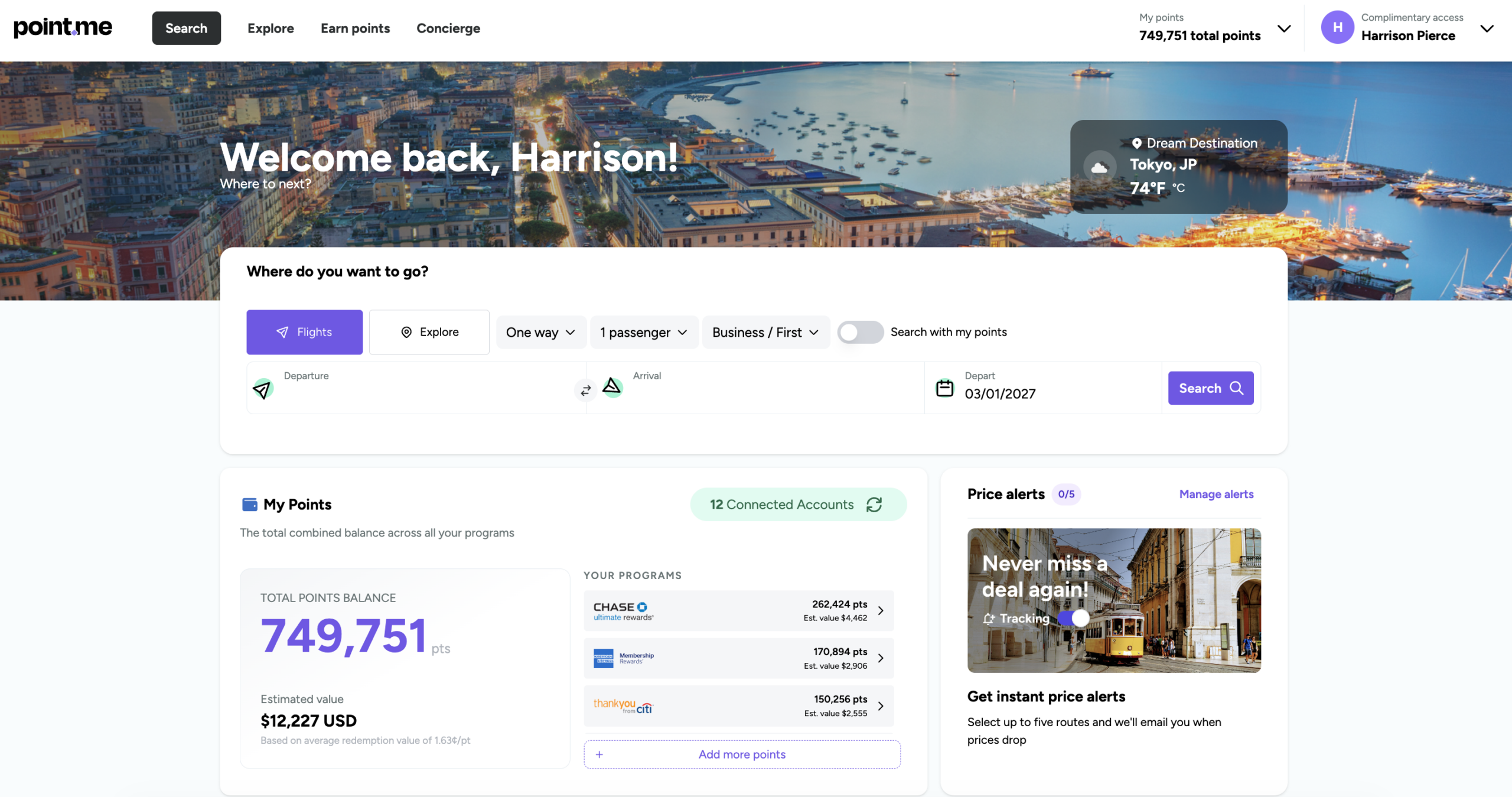
Once you've filled out your account, you're ready to go. The Point.me homepage includes all of the most important information. Below the search bar, you'll see your point balance and estimated value of those points, any price alerts you've set, your recent searches, top deals from your home airport, and some helpful tips on finding great deals.
When you are ready to perform a search, you can enter your departure airport, arrival airport, date, number of passengers, preferred cabin, and whether you're traveling one-way or round-trip. One great thing to point out (pun intended) — you can now initiate multi-city searches if you have a premium plan.
If I knew I wanted to go to Europe from the East Coast in April 2027, I could enter Boston (BOS), New York (NYC for all airports), and Washington D.C. (WAS for all airports) in the departure section, and Madrid (MAD), Paris (PAR for all airports), and London (LON for all airports) in the arrival section. In other words, I can search dozens of routes in one swoop.
You can also toggle on the “Search with my points” feature. When this is enabled, your results are much more personalized. You'll only see redemptions you can book with your points that are in your Point.me account. If you've manually entered your balances, it's worth keeping an eye on them to make sure they are up to date for the most accurate results.
One of the biggest critiques of Point.me in the past was how long it would take for results to appear. If you only wanted to search one or two things, it wasn't a huge deal if it took two full minutes for Point.me to return any search results. However, if you have a lot of research to do, that could quickly become cumbersome.
Now, the vast majority of Point.me's search results return in 20 seconds or less. In my experience, it's even faster. You can now jump to the day before or the day after at the top of the screen, but Point.me also introduced a new Explore tool that lets you view full award calendars — more on that in a bit.
Point.me has also introduced a variety of helpful filters:
- Points programs (including credit card and airline programs)
- Airlines
- Cabin
- Number of stops
- Departure times
- Airports
- Aircraft
You can order the search results by Point.me picks, fewest points, and quickest flight duration.
Here is a search result for a flight from Boston (BOS) to Athens (ATH) in May 2027.
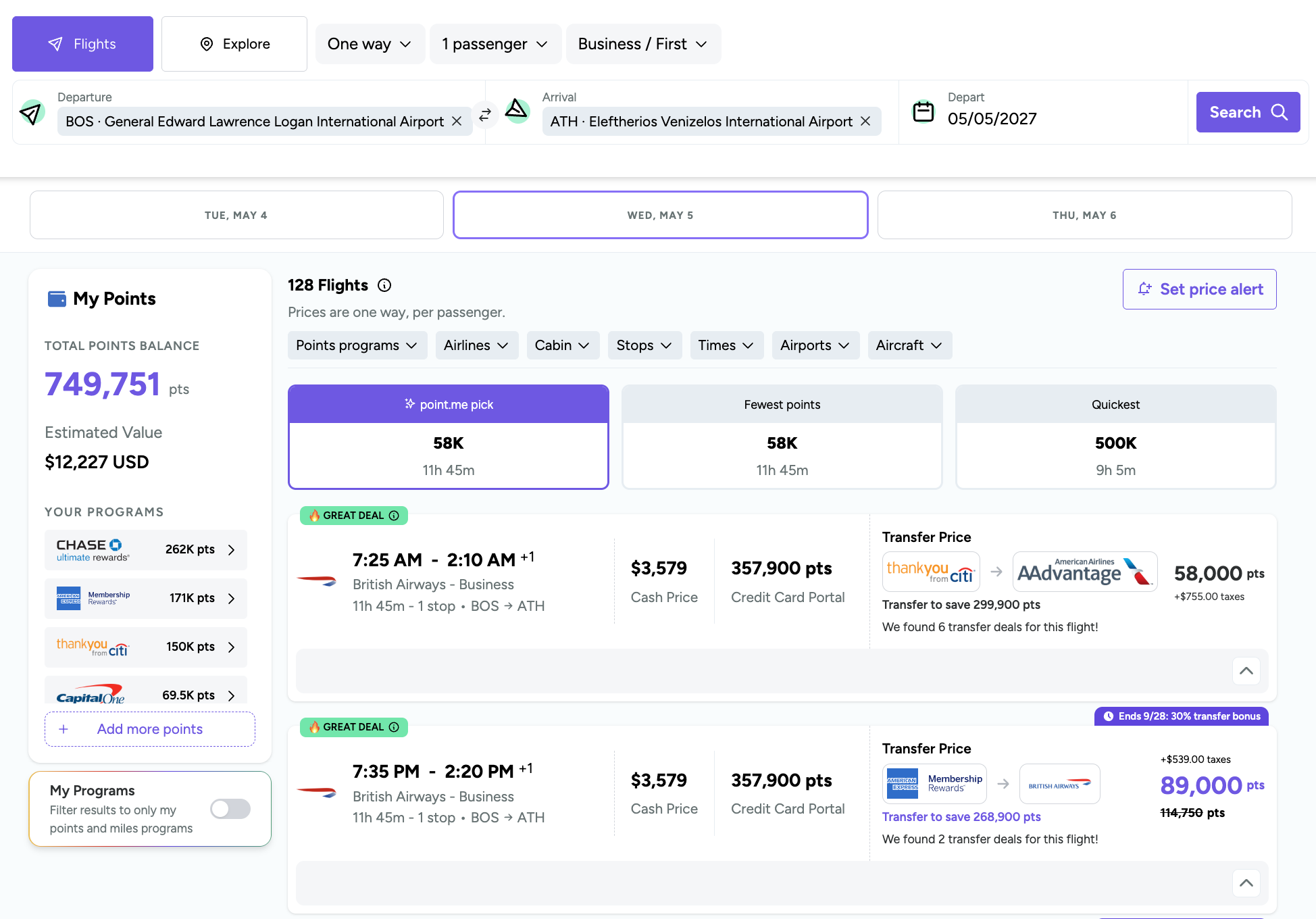
Each result contains a ton of helpful information about the flight, including the cash price, how many points the flight would require if booked through a credit card portal, and the taxes and fees required to complete the booking. Point.me also builds active transfer bonuses directly into the search results. This information is helpful when you're comparing booking methods.
For instance, in the above result, I could book a business class flight from Boston (BOS) to Athens (ATH) for $3,579 in cash, 357,900 Citi ThankYou Points through Citi Travel, or just 58,000 Citi ThankYou Points transferred to AAdvantage, plus $755 in taxes and fees. I don't mind paying high taxes and fees when I'm saving almost 300,000 points.
You'll also see standard information like the cabin class and flight duration. Point.me now flags a result as a “Great Deal” if you're getting a solid value from your points and miles.
When you click on a result, you'll see more information on the exact itinerary and step-by-step instructions on booking the award. Step-by-step instructions will help first-time award travelers immensely, but they can also help seasoned veterans. Even the most experienced travelers might book flights through a new program, so a little guidance never hurts.
You'll also see additional transfer options, if available.
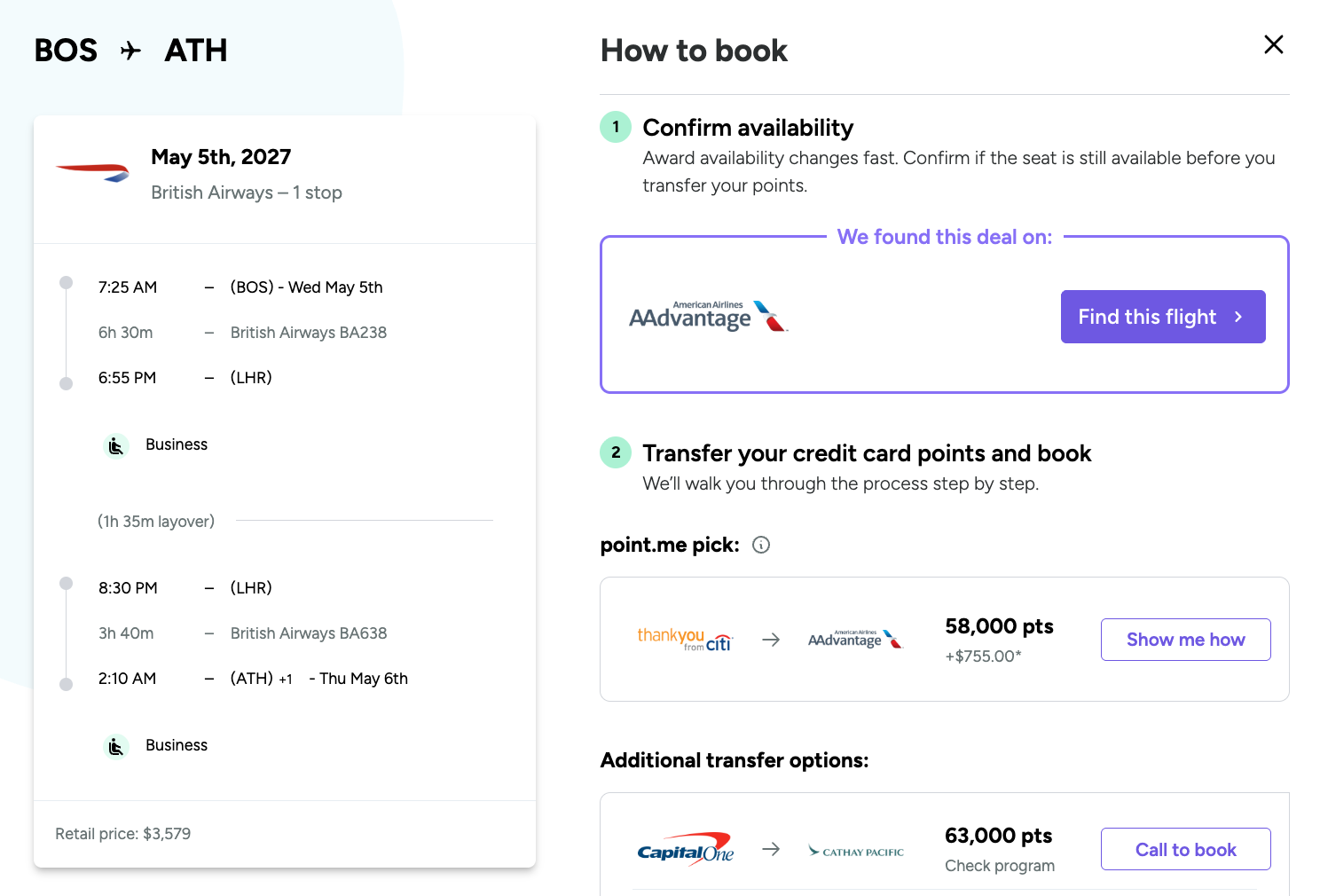
When you click “Find this flight,” you will be redirected to the airline booking page to complete the booking.
Be aware that award availability can change quickly. This is especially important to remember when planning and booking award travel. AwardWallet tracks transfer times in more detail, so that's a good place to start before initiating a transfer. A best practice is to search for the award space with the specific program to replicate results, especially before making any point transfers.
Explore
The Point.me Explore tool has been completely overhauled, and its improvements make it almost unrecognizable. Let's say I'm planning out my 2027 travels. I can enter all North American airports in the departures section and “Anywhere” in the arrivals section, then select a date range of January 1 to August 20, 2027. Next, I can scroll through the map to see destinations I might want to visit.
I'm met with hundreds of results around the world, and I can once again search with my points or through individual programs, and filter by cabin or number of points.
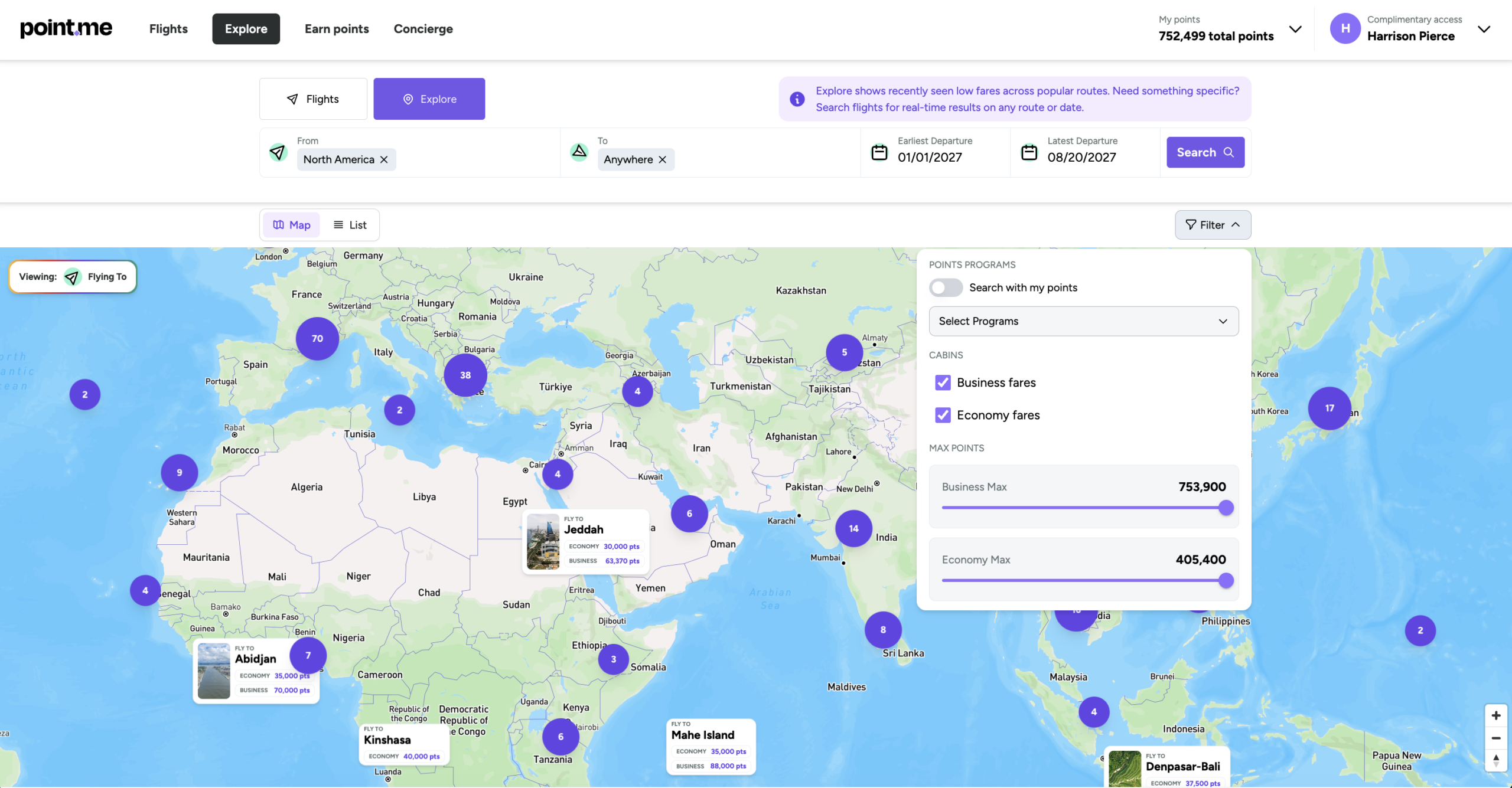
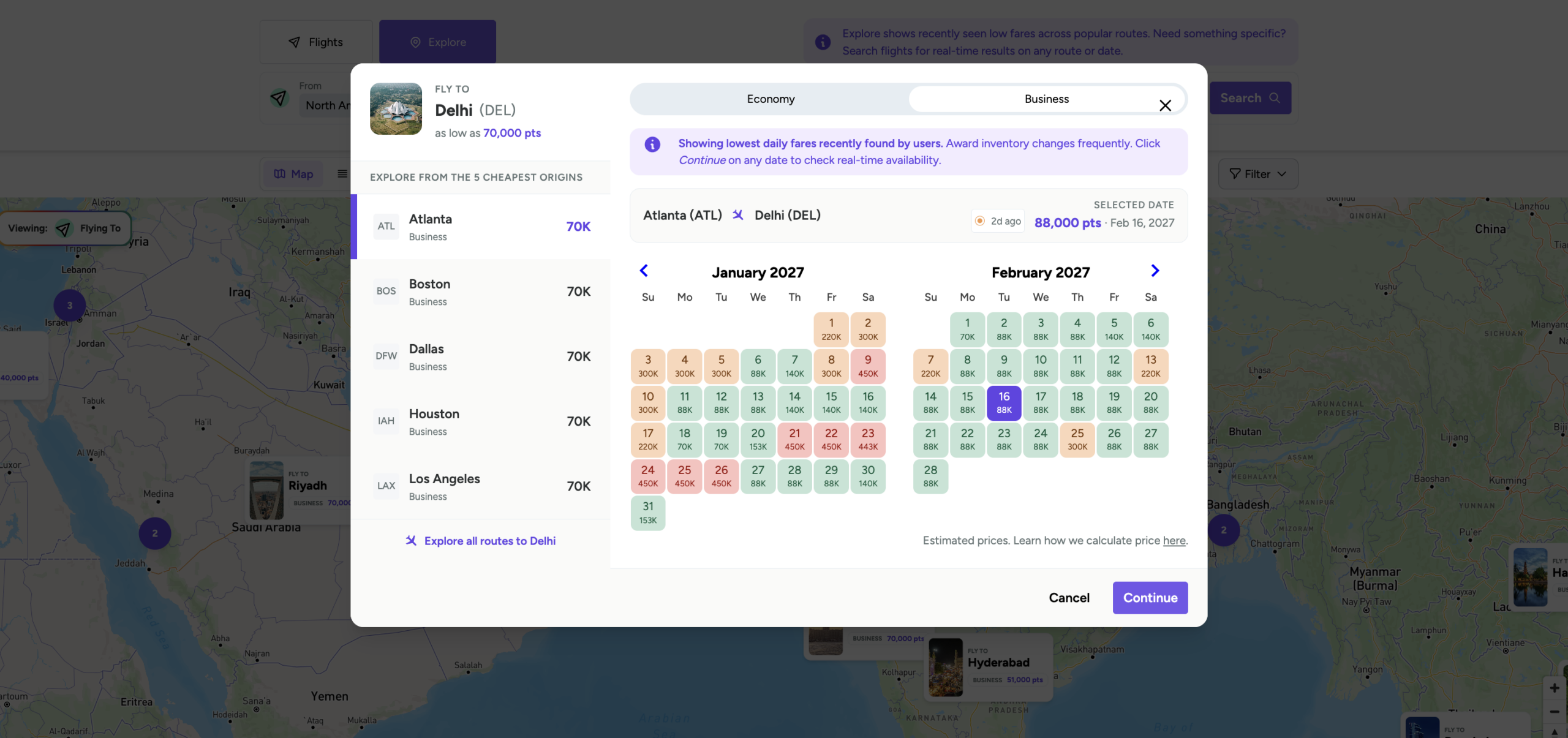
Clicking a destination takes you to an award calendar, where you can click “Continue” to run a live search and view your booking options. The award calendar is a great new addition that lets you clearly see award pricing across multiple cities for two months at a time.
If you're a frequent traveler, you know how much adjusting your dates by just a day or two can slash costs. The Explore tool now gives you a bird's-eye view of pricing so you can easily book your flight.
Point.me concierge services
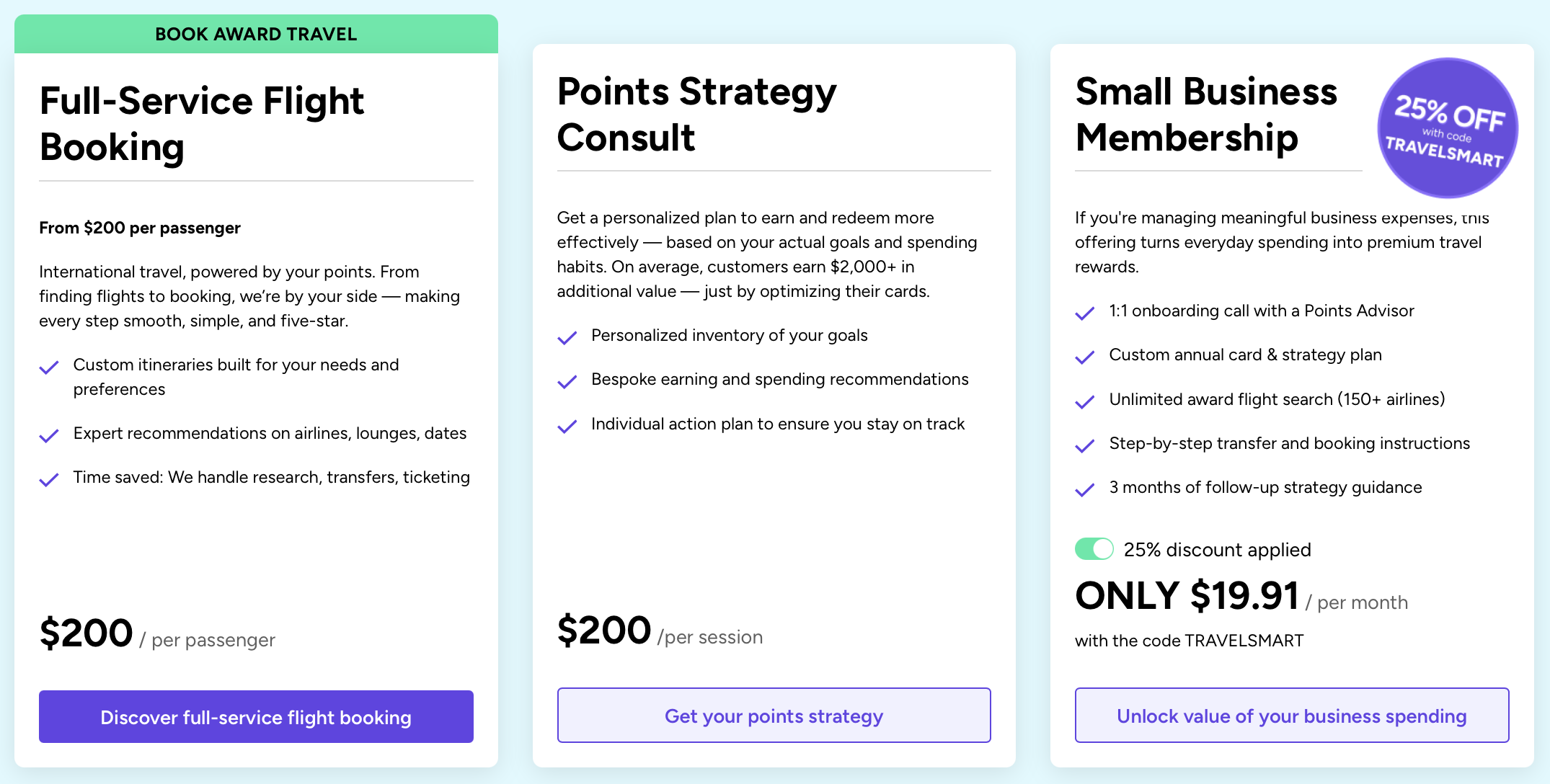
Point.me offers additional award travel services. You can opt for full-service flight booking if you want to be as hands-off as possible, which starts at $200 per passenger. Or, you can select a points strategy consult to maximize your earnings and redemptions with the help of an expert. Finally, small business owners can sign up for a small business membership to help with business travel.
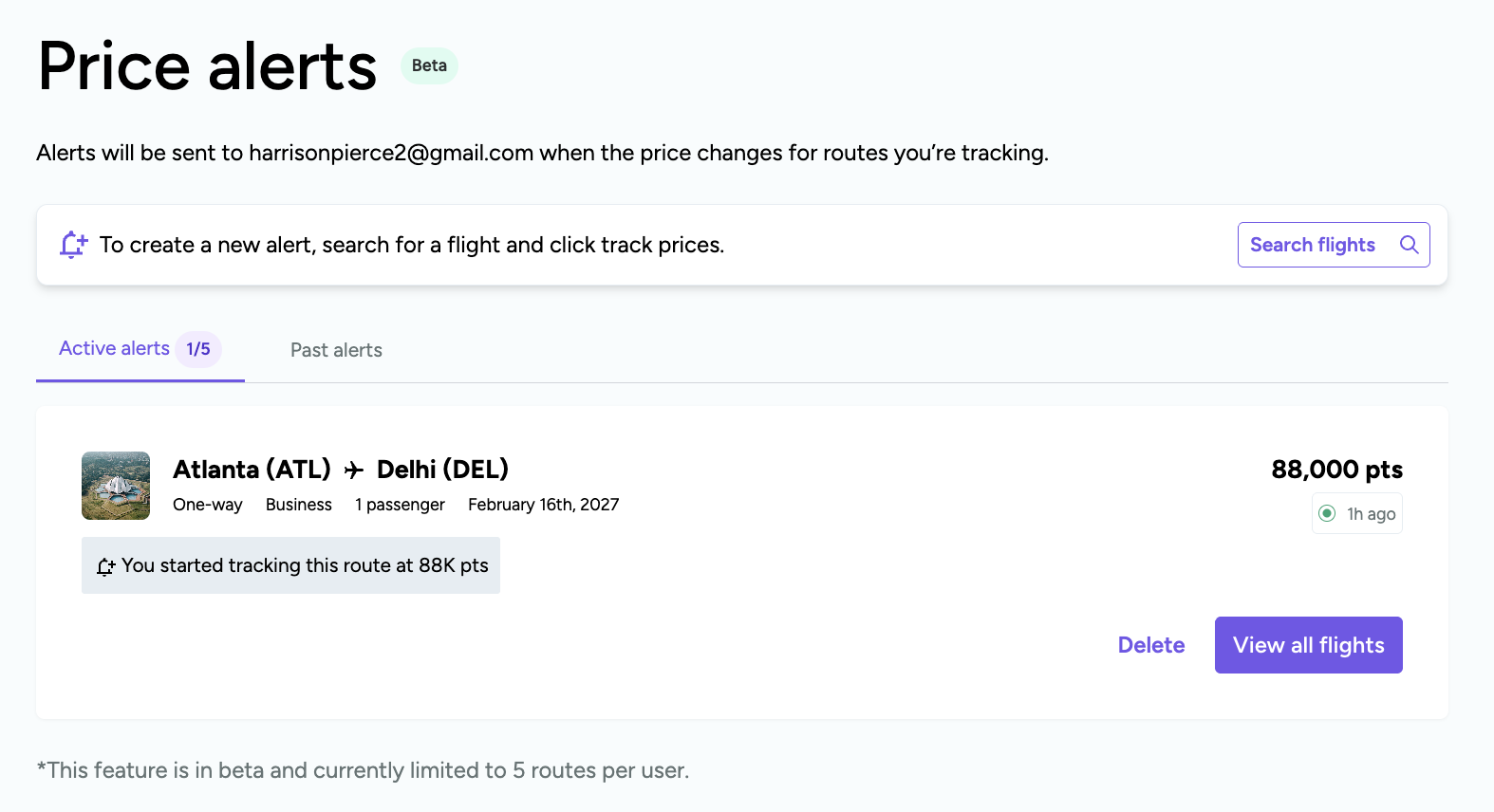
Flight Alerts
If you have a paid version of Point.me, you can set alerts on your preferred flight route to monitor for better deals. First, you'll need to perform a search.
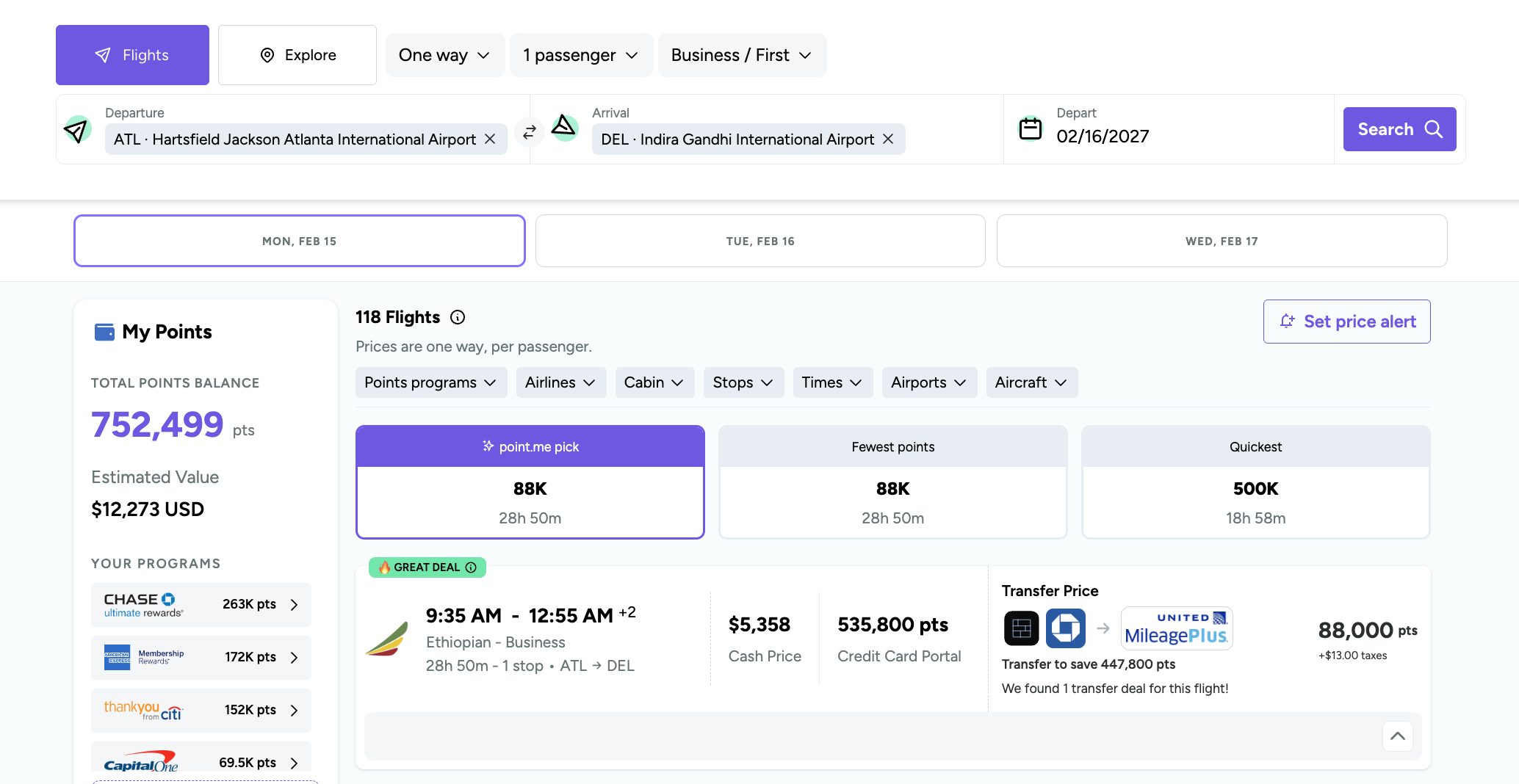
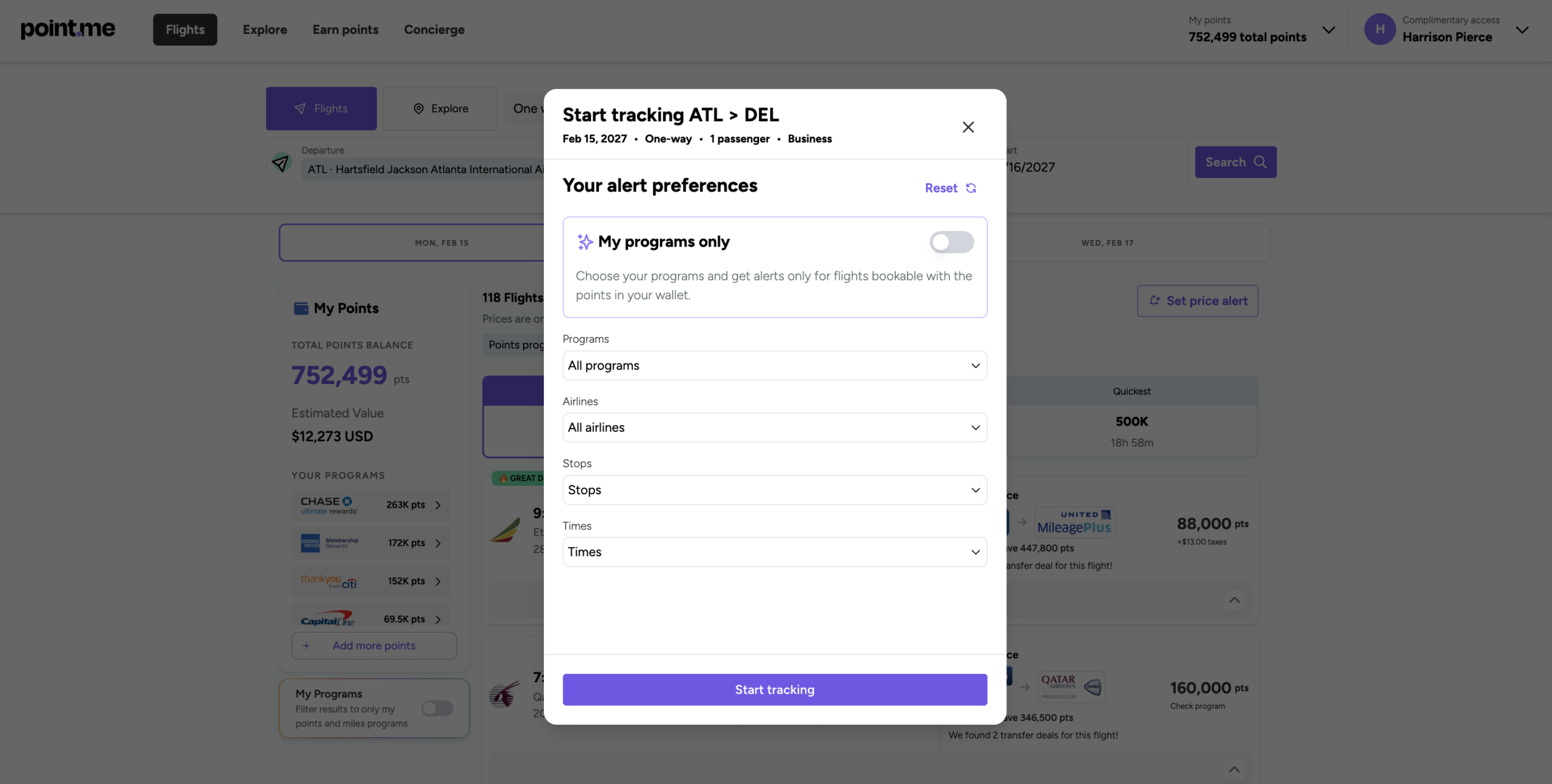
Next, click “Set price alert” just below the dates, and you'll see the pop-up where you can customize your alert. You'll be notified via email if Point.me finds a lower price for the route and date with your preferences.
You can then manage your alerts in your account settings or directly from the home page.
Is Point.me Worth It?
When we first reviewed Point.me, we noted several drawbacks, including:
- No option to search multiple days at once
- No ability to search multiple origin/destination airports
- Limited alert functionality
- Somewhat basic features that competitors outperform at a lower price point
Credit where credit is due: Point.me has not only addressed each one of these issues, but it's added functionality we didn't even realize we wanted.
Point.me isn't necessarily cheap. Even when you sign up for Point.me using the AWARDWALLET4 discount code, you're paying $95.99 for a year of standard or $193.47 for a year of premium. However, when you save tens of thousands of points and tons of time by being able to quickly find a high-value award redemption, the membership has already paid for itself.
What sets Point.me apart from its competitors is that it isn't using stale or cached inventory. You're viewing real-time results thanks to Point.me's airline partnerships. There's nothing more frustrating than using a competitor tool and thinking you've found a great deal on a flight, only to realize it sold out a few days ago. Point.me solves that frustration, and its advanced functionality makes it incredibly easy to use.
Bottom Line
Point.me is a fantastic award search tool. Since its launch, it has added tremendous functionality and improved its performance. Its most recent updates — price comparisons, all-new Explore, faster search, better price alerts, and the introduction of multi-city searches — have completely transformed Point.me from a “nice to have” tool to something that any award traveler can't live without.
If you haven't signed up for Point.me yet, use code AWARDWALLET4 to get 25% off an annual subscription.