



AwardWallet receives compensation from advertising partners for links on the blog. The opinions expressed here are our own and have not been reviewed, provided, or approved by any bank advertiser. Here's our complete list of Advertisers.
Chase offers one of the most comprehensive credit card portfolios available, with many of its cards ranking among the best for specific spending categories. With so many options available, it's common for customers to hold several Chase cards — particularly if they have both personal and business accounts. That can lead to juggling multiple Chase logins.
To simplify things, Chase added a feature to its online account center. Previously, combining online account logins was possible but required a phone call. Now, you can connect your Chase logins online in just a few minutes.
Here's how to combine your online profiles — and why you should do it.
How To Combine Two Chase Account Logins
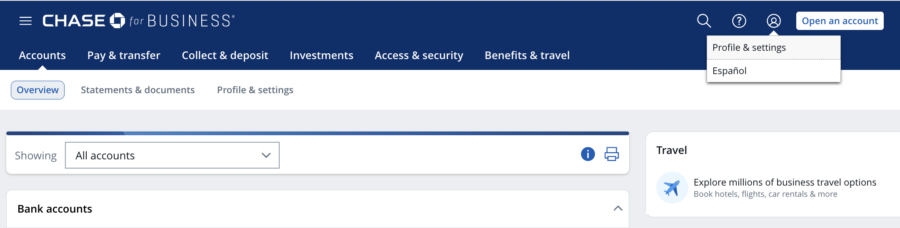
The easiest way to combine two Chase account logins is on a desktop computer. To start, sign in to the account you want to use as your main account. Once logged in, click the person icon at the top-right corner of your Chase dashboard and select “Profile & settings.”
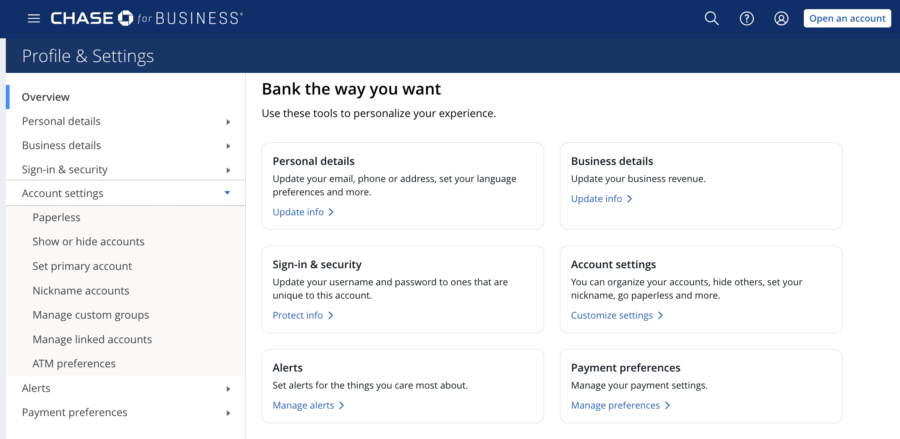
Once there, click the “Account settings” link on the left-hand navigation bar. Choose the option that says “Manage linked accounts.”
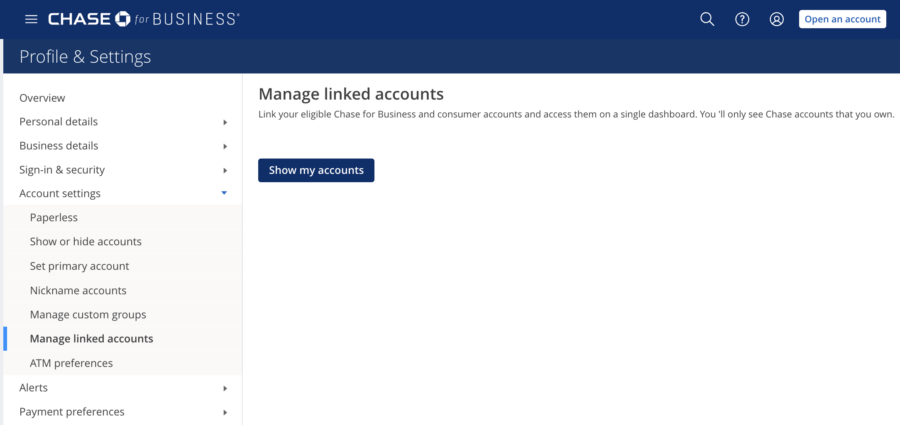
Next, click “Show my accounts.”
Chase will then display all profiles and accounts available to combine under one login. Click “Link relationship” next to any Chase accounts you want to merge into this login. Chase will ask you to confirm before submitting your request.

If successful, Chase will display a confirmation screen showing, “Your account has been successfully linked.” It's that simple!
What account to keep if you have a small business
If you're linking both a Chase business and a Chase personal account, you'll need to keep the business profile and merge your personal account into it. Chase doesn't allow business accounts to be added to a personal profile. Regardless of whether you're signed in to a personal or business account when submitting the request, the process is the same.
How To Use Your Combined Chase Online Account
Once you've successfully combined your Chase accounts, you'll be able to view both your personal and business accounts in one place.
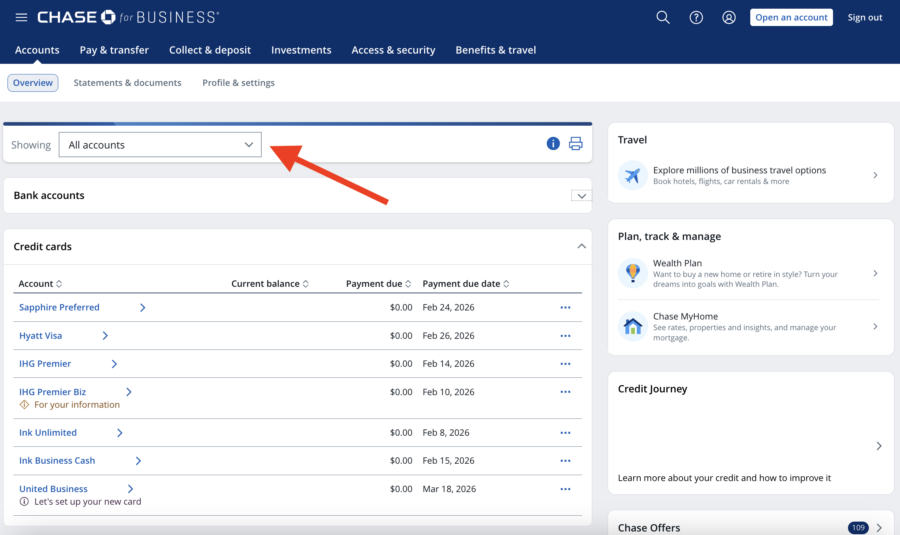
On desktop, a combined business and consumer dashboard includes a drop-down menu at the top of the screen that lets you change how they're displayed. You can view all accounts together, filter by business or personal accounts, sort by banking or credit card accounts, or create a custom group.
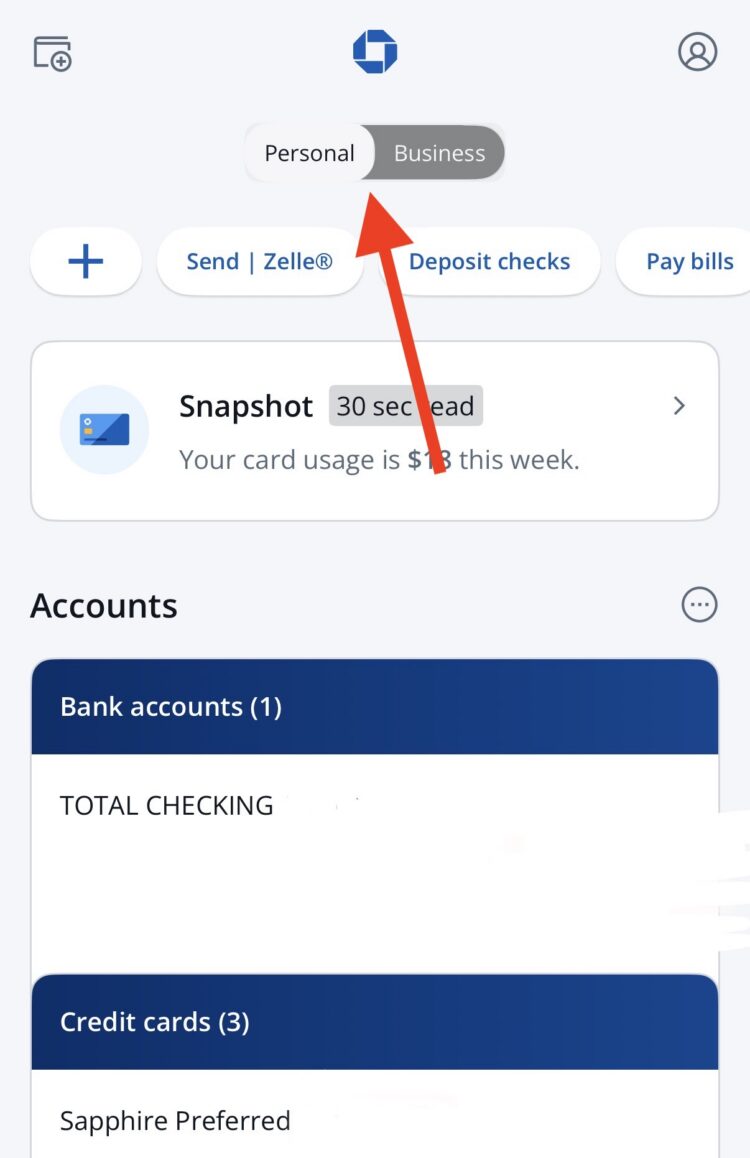
On the Chase mobile app (Apple/Android), simply toggle the switch between your business and consumer accounts.
Why You Should Combine Your Chase Logins
Aside from seeing all your balances in one place — making it easier to track spending and payment due dates — there's another benefit to linking your Chase accounts. Chase allows you to combine your points and cash-back rewards across eligible accounts. Doing so only takes a few clicks once you've connected everything under one profile.
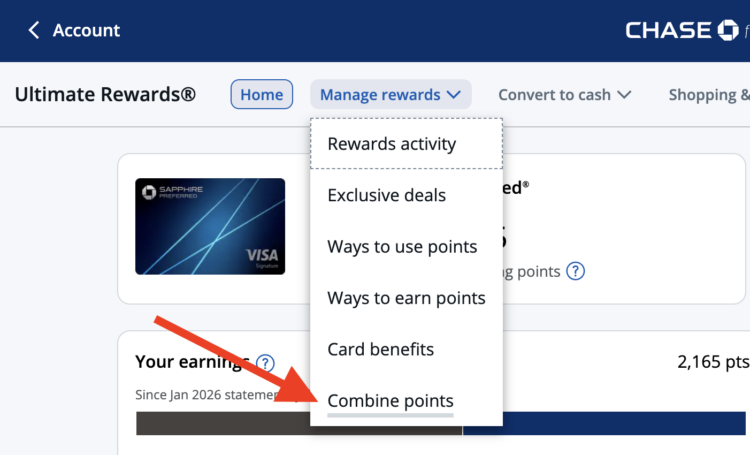
To combine points, open your Ultimate Rewards® dashboard. Then click “Manage rewards” on the top bar. Choose “Combine points.”
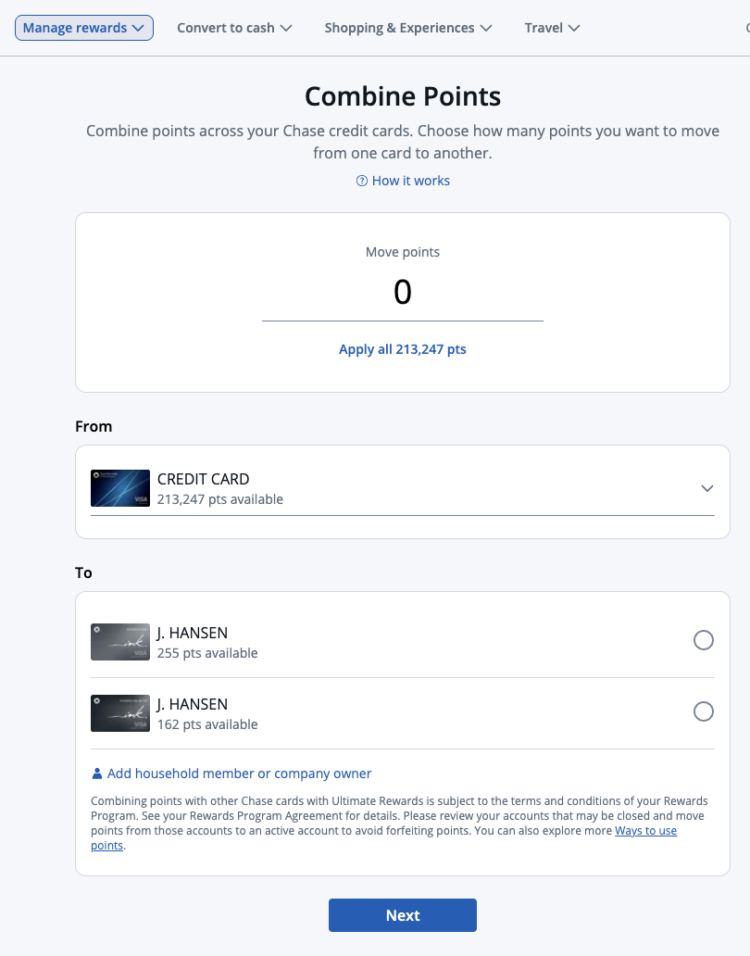
Next, Chase will take you to a page where you can choose how many points to move, along with the account you're transferring from, and the account receiving. Follow the prompts to confirm the transfer.
You can only access Chase's 14 airline and hotel partners from certain cards. Moving your rewards to one of those eligible cards makes it much easier to transfer points.
You'll need one of the following Chase Ultimate Rewards cards to maximize your Chase earnings:

$95Rates & Fees
- 5X points on Lyft rides through September 2027
- 5X points on travel purchased through Chase Travel℠
- 3X points on dining at restaurants worldwide
- 3X points on gas and EV charging
- 3X points on vacation homes at top brands like Airbnb, Vrbo and more
- 3X points on eligible streaming services
- 3X points on online grocery purchases (excluding Target, Walmart, and wholesale clubs)
- 2X points on all other travel
- 1X point per dollar spent on all other purchases

$795Rates & Fees
- 8x points on all purchases through Chase Travel℠
- 4x points on flights and hotels booked directly
- 3x points on dining worldwide
- 1x points on all other purchases
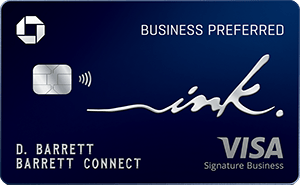
$95Rates & Fees
- 3X points per $1 on the first $150,000 spent in combined purchases on travel, shipping purchases, Internet, cable and phone services, advertising purchases made with social media sites and search engines each account anniversary year
- 1X point per $1 on all other purchases
Related: How To Transfer Chase Ultimate Rewards Points: A Step-By-Step Guide
Final Thoughts
Combining your Chase accounts makes it much easier to manage both personal and business cards in one place. While this process previously required a phone call, most accounts can now be linked online in just a few minutes.
Occasionally, a newly opened account may not appear as an option to link, so you'll still need to call Chase for assistance. But in most cases, the online method provides a faster and simpler way to manage your accounts and move rewards when needed.
For rates and fees of the cards mentioned in this post, please visit the following links: Chase Sapphire Preferred® Card (Rates & Fees), Chase Sapphire Reserve® (Rates & Fees), and Ink Business Preferred® Credit Card (Rates & Fees)














It looks like its even easier:
Go to your account
Click on 3 bars on upper left
Account management
Profile and Settings
Account settings
Manage Linked Accounts
Show my Accounts
anything that is linked to your SSN should show up, and then just click the link on the accounts you want.
Easy-peasy squeeze the lemon,
Thanks, Max! The blog post method didn’t work, but yours did!!!
I don’t know whether it doesn’t yet work the way you describe, or no longer works that way, but as of this morning, Chase told me that linking business to personal accounts has to be done by a rep (and he did it quickly and with no problems).
That’s after three days of trying to follow the route through secure messages only to find at the final submit button to merge a message that says that that part of the website is not working now and please try again later. Wish they had just put up a “call your rep” message!
Oh weird! The secure message way definitely worked for me when I went through the process myself. But perhaps Chase has pulled this option.
I’ve had a business account that shows both my personal and business for some time. I still miss however what they used to have which was a summary of the ultimate reward points for all of your accounts that no longer exists.
How do we unlink accounts if needed?
I believe you need to contact Chase by phone for that.
This was previously one of the most frustrating aspects of having the Chase Ink cards in combination with the other chase credit cards. A few things that i’ve noticed even after you combine accounts. 1) You may not be able to have all the functionality of chase checking depending on which login you ultimately use as your ‘primary’. 2) The daily wire transfer limit maybe different depending on which account you use as your primary account.
Is this working for others? When I log in to my business account and try to link personal login, nothing happens after I click Continue button.
I got all excited when I saw we could combine accounts, but unfortunately we can’t keep the personal account setup. I’m not crazy about the business platform or my login. Oh well…
I have always wanted to combine my business account with the personal account but wasn’t doing it due to having to call, just filled the form out with this guide and hopefully will have a combined account soon
Very convenient! My business banker showed me in 2018 how to combine logins for my Chase business and personal accounts. Perhaps at that time it was an insider secret.
Useful article! Anyone know if the same can be done for Amex accounts? Thanks!
I’ve been wanting to do this to my wife’s accounts for a while now. Thanks for the step by step. Now to see if it actually works.
This definitely is a welcome change for those with a lot of chase credit card account.
Unfortunately this hasn’t worked for me also however shall try again, thanks for the guide
Now if its only possible to see the business and personal accounts on 1 screen without toggling that would be great!
Handy tip to consolidate multiple Chase logins. Chase has some great cards (Southwest, Sapphire Preferred or Reserve, Hyatt, IHG) – just wish they’d loosen up on the 5/24 rule a bit sometimes…..
This is great way to keep everything in one place with Chase.
I think this is quite an improvement. This specific instructions on how to make this happen a really nice.
Is there any downside to doing this?
Apparently i will not advice anyone to use any these referrers most of them are freaking false. thanks to this man who fixed my credit in 3weekssometime in October . try him on emmygreysmoothoperator AT Outlook DOT com
This did not work for me. This may be permitted for personal accounts, but I tried doing it for a business account and got the message: We have the username you’re signed in with. Please tell us about your other username or account. If you’d like to link or combine 2 business accounts, please contact us. I suggest editing this blog post and placing that information toward the top, to save others time.
I am a signer on my parent’s Chase accounts. I have the Chase app which allows me to transfer money and pay bills for them as they don’t do anything online. This was always fine as I personally did not have accounts with Chase. Recently we refinanced our home through Chase and I opened an Amazon Prime credit card, which is also through Chase. Both of my new accounts appeared in the Chase app without my setting them up (along with my parents’ accounts). My main checking account is through another bank. I am having difficulty adding an external account to pay my mortgage. I added the account, but the only option to “Pay from” are my parent’s accounts! I have called in three times to try and remedy this.
Long story for a short question. Can I have two separate logins? One for my personal accounts and one that is just my parent’s accounts. I ended up sending a check for my first mortgage payment because I couldn’t get it figured out in time to make the payment online. Big pain! I don’t want to do that every time. HELP!
Hey Jani, sorry to hear about the trouble here. You may have just gotten unlucky with phone calls to Chase. They should be able to separate the logins—especially considering they are different account holders. I’d keep trying and do my best to escalate to a supervisor.
I just tried this and stopped when I saw the 2 options. Neither lets you eliminate one username entirely. So you still end up with 2 usernames but are able to see the personal one in the business or vice versa. I was hoping to get rid of one username entirely.
This is interesting. I haven’t had the need to do this. I can see the business and personal but I don’t see how someone would have multi personal accounts with different sign ins? Oh well. Anyway at least they are trying to make things a little easier.
Good thing that they now make it easier to do all things online. This helps both side as it lowers cost and the human factor.
Can you get Chase Ultimate rewards with a business account?
You sure can! The Ink Business Preferred is a solid small business card that earns Ultimate Rewards points. Check out our review of it here: https://awardwallet.com/credit-cards/chase-ultimate-rewards/ink-business-preferred/
So if I combine my husband’s account with mine is it going to change anything as far as the ability to to get separate cards in the future? Say we both want to get the same United card will having a combined account make it so only one of us gets it?
Unfortunately for those in “2-player mode”, Chase won’t let us combine accounts with different people – even our spouse. So, we will still need to have at least two logins.
Not really sure about this. I thought multiple chase card accounts shared the same login anyway? – Why the need to combine anything ?
Personal cards can be combined into one login, but business cards have needed to have their own login. If you only have personal or business cards, there should be no need to combine.
I see, this is mostly the issue for business card accounts.
This is good to know, but I think I am going to leave my two accounts separate for now. I find that the login on the app is pretty easy. I have it set up so when I want to log into the personal account I use my fingerprint. If I want the business account, I use the username and password..
Yes for me as well (except Face ID). The offers are always different for business & personal accts & don’t want to possibly rid myself of some no-hassle options down the road.
Sometimes, there are grounds for separate log in credentials, such as your case.
Good move from chase to improve customer experience.
Combining two accounts is a huge advantage. I like that aspect of this deal. Hopefully we can get out from under the oppressive leftist restrictions and travel more soon!
The cards are automatically added to the same login by default. How is this even possible?
Is the enhancement really new? I am confused.
Convenient. Surprised it took this long to implement.
Chase leads the way. Again.
Am I missing something? All of my chase card accounts have been sharing the same login for years, literally from the very beginning.
Before you’d have to go thru & redo all your settings when combining. Is this no longer the case? Thanks
Anything that improves the user experience when handling cards is welcome.
DOes this lose the benefits of the personal profile deals and add ons?
Hey Tim, can you be more specific? I have had a combined login with the business version for a long time, so I might be able to tell you if something specific is missing from the business interface.
There are certain features on the personal platform not on the biz, like the ability to nickname accts. I’m guessing since moving to biz those are the features you are left with & they are not as good. Before if rep did for you, you would lose all of your online transaction details from your personal accts. Wondering if that has changed?
Wish I could be more help. Please let us know if you combine and something important goes missing.
Anything that simplifies life is good with me, even if it’s not a big deal in the grand scheme of things.
Good change, hope it is followed by others
Always nice to eliminate a login and see everything in one place. Glad to see Chase has finally made this happen.
Yes, I might let Elon put his AI-chip in my brain, just so I don’t have to deal with logins anymore. LOL
Awesome! Can you explain the two options? For example, will the second option allow me to pay my personal card balance when logged in to my biz profile? What should I consider in deciding between the two?
KC: The second option notes that “All payment and transfer info (account transfers, Bill pay and Chase QuickPay) will remain separate.” So, I’m assuming that you won’t be able to make payments in your biz profile after linking accounts. I just linked my accounts using the second option, but it seems it will take 24 hours to complete.
It should be noted that this function only allows combining into the business account profile, not the personal.
That’s in the post 🙂
“Note that if you’re joining a business login and a personal login, you’ll have to keep the business login and add the personal account. You can’t add a business login to a personal login.”
So it is, I managed to miss that somehow.
Ha, I actually missed that too and was wondering. Thanks for pointing it out JT.