






AwardWallet receives compensation from advertising partners for links on the blog. The opinions expressed here are our own and have not been reviewed, provided, or approved by any bank advertiser. Here's our complete list of Advertisers.
For a lot of people, the beginning of fall is synonymous with new phone season. This is when companies like Apple debut new products, and people (like me) jump at the chance to upgrade to the latest and greatest technology that fits in their pockets. It's almost like a holiday.
But if upgrading your device is something you’re planning to do, and you also have an intended use for your
Now you’re probably wondering what getting a new phone has to do with transferring Capital One miles. Let me explain.
Upgrading Your Phone? Transfer Capital One Miles First
As the saying goes, you learn something new every day. Yesterday, I learned that if you’re getting a new phone and want to use Capital One’s transfer partners, it’s best to make your transfer first and then upgrade your device.
Apparently, the order matters. I didn’t follow it, and now I’m locked out of accessing Capital One’s transfer partners for anywhere from a few days to a few months.
Here’s why. When you get a new device — even if your phone number stays the same — Capital One’s systems might not recognize that it’s actually you trying to log in. So, when you try to verify your account online or in the app, you might get stuck on this screen after entering the text verification code correctly:
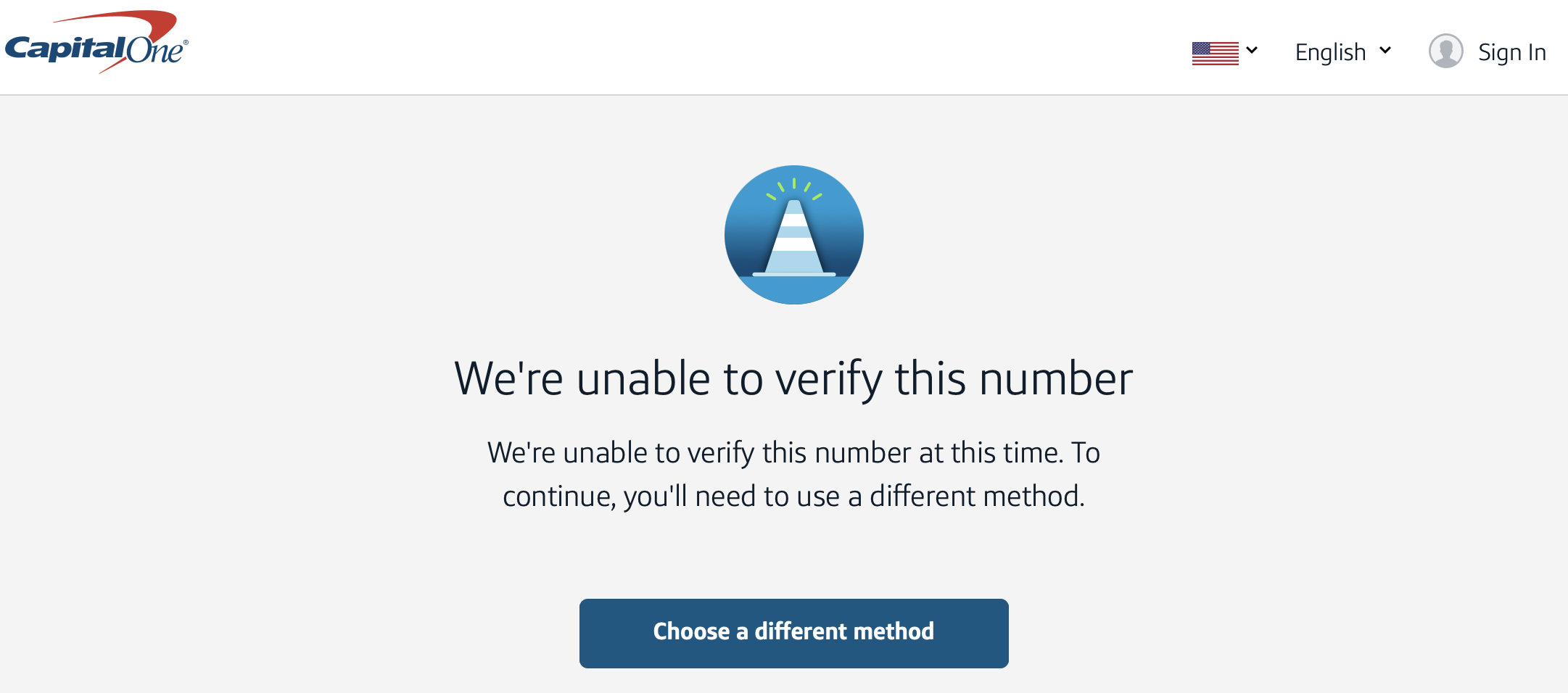
That’s exactly what happened to me. After enough failed attempts, I was prompted to call Capital One. The agent asked if I’d recently gotten a new device, and when I said yes, she told me she’d seen this issue before. I’d simply have to wait until the system recognizes the new phone as mine. Only then will I regain access to Capital One’s transfer partners.
It could take days, weeks, or even months. At minimum, I have to wait at least a week before calling back to escalate the issue.
AwardWallet reached out to Capital One to confirm whether this is truly a known issue and to ask if any steps are being taken to prevent it from happening to other cardholders — especially since so many people upgrade their phones around this time of year. And a spokesperson for Capital One responded with the following:
“Capital One takes account security very seriously, and what you experienced reflects the safeguards the bank has in place to protect customer accounts as part of its fraud prevention policy.”
Make of that what you will.
Bottom Line
Does this make any sense? Not really. I've never had this happen before. And as someone who redeems miles as quickly as I earn them, the thought of waiting up to a few months to get back into my account isn’t exactly something I’m thrilled about. It’s frustrating that the only solution is to wait patiently. I’m not very good at that.
So, if I can offer a word of caution, don’t make the same mistake I did. Transfer your Capital One miles before getting a new phone. Doing so means you’ll likely avoid the tech issues I ran into.
















And then… let’s say you immediately head out of the US with your shiny new phone, and you’re using an eSIM for a local number (Scotland), and the only way to verify is via a text to your US number….
I had to remind myself, NO CRYING ON THE YACHT….
> Does this make any sense? Not really.
It is ridiculous that they don’t provide a way to manually verify & unblock within a day, but it does make sense as a security measure. SIM swapping is a threat, in which a thief can get 2FA access to all of a victim’s accounts by taking over their phone number on a new device.
Wow. This is ridiculous. I’ve never heard of a company having a problem because your registered number is being used on a new phone. If they want to be that anal about security—and I’m all for reasonable security—they shouldn’t be using email or texts as a means of 2FA anyway. An authenticator app is a much better solution.
It seems like there are multiple ways that fraud prevention practices can screw over legit users. My 88 year old mother got locked out of her iCloud account this summer and there is no way she’ll ever be able to get back in. It’s not an issue of encryption either. Apple could help her, but they won’t. Apple doesn’t care about IDs, passports, or any other objective means of proving her identity. If she can’t remember the name of her first boss, her best friend in high school, and what she wanted to be when she grew up, her account will be forever locked.
Cap One has some of the most archaic security practices… Ever heard of FiDO? Way more secure than their current setup.
Going a little Captain Obvious here but why not log in through your laptop and do the transfer from there?
Also, I’m presuming that you can actually access your C1 accounts while their algorithm figures out that you’re really you. Is that the case?
Hi Christian, I tried the laptop first — on multiple browsers — and then the app. But Capital One (still) won’t permit me to log in at all to view transfer partners. But yes, I can still log in and pay my credit card bill, so there’s that!
This is a really helpful reminder—phone upgrades are one of those sneaky times when points balances can get overlooked. I’ve seen people lose miles by waiting too long to transfer, so locking them in ahead of a device switch makes a lot of sense. It’s also a good nudge to check if transfer bonuses are available before making the move, since that can stretch the value even further.
I wonder if this applies to those of us who access our Capital One account from a laptop instead of a phone..
When transferring points via computer, you still need to get a two-factor authentication number via text. That’s when this issue popped up.
The same applies in the app, too!
What are the “different methods” they offer?
What they’re doing protects your account from attacks by getting your number stolen (moved to a new SIM).
There was only one “different method” after clicking that blue button, and it was to get another text.
And all the fraud security measures make sense. But with so many phones moving to eSims nowadays, you’d think Capital One would account for this. Locking cardholders out of important account features like transfer partners for up to months just isn’t ideal.