




AwardWallet receives compensation from advertising partners for links on the blog. The opinions expressed here are our own and have not been reviewed, provided, or approved by any bank advertiser. Here's our complete list of Advertisers.
Renting a car can be a stressful and expensive part of traveling. In this guide, we'll show you how to use the powerful capabilities of AutoSlash to simplify the process and save money on your next car rental. And this comes from personal experience. I've rented with AutoSlash numerous times. The service has rarely let me down. It's my go-to choice for booking car rentals.
Here's how AutoSlash can help you save money on your next rental.
What is AutoSlash?
AutoSlash is a free, online service that uses a database of discount codes, coupons, and promotions to generate the best prices for any rental car criteria. Just enter your rental location, pick up and drop off, and then add any of the various memberships and coupon qualifications you currently hold.
The details of the request are up to you, and you can choose to include or not include various credit cards or memberships in the search criteria. AutoSlash then takes care of the rest. It won't be long before AutoSlash emails you the best deals it can find.
Best of all, even if you make a reservation elsewhere, you can add it to AutoSlash to track rates and see if the price drops. This is an extremely helpful feature. If AutoSlash finds a cheaper rental, the platform will alert you, and you can quickly rebook at the lower rate.
AutoSlash offers all of this free of charge. In addition, you can use AutoSlash for a rental from any location of a major car rental company, not just for airport car rentals.
You do have to provide your name and email to AutoSlash to get a quote. This might seem a bit dubious, but it's a necessary part of the booking process. Generic reviews of AutoSlash usually rate it from average to good; the company's Google rating in particular is very high. I've used AutoSlash for years and never had an issue, and I'm more than willing to vouch for the service.
Let's walk you through how to request an AutoSlash quote and complete a reservation. Then, we'll share some tips for getting the most out of this service.
Booking a Rental Car With AutoSlash
You need a rental car. Now what? Start by heading to AutoSlash.com. It takes just a few minutes to request a quote. What's nice is that future searches can be even faster. If you allow cookies on your computer, AutoSlash will remember your search preferences for the next time you request a quote.
Request a quote
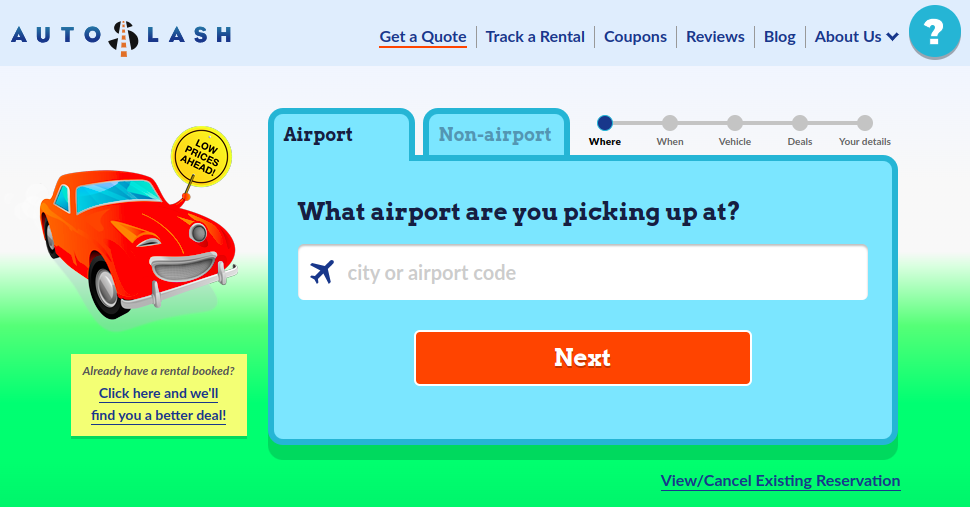
On the AutoSlash home screen, start with your pickup location. Use the tabs at the top to switch between airport and non-airport options. From there, click through each screen and provide all the typical information: drop-off location (if different than pick-up), rental dates, vehicle type, etc. If you don't want an electric vehicle, you can request that the search return gas vehicles only. My only complaint about the vehicle type selection page is that you can only pick one option. Sometimes I'd be fine selecting a subset of available options. That being said, I usually leave it with “Least expensive option” selected. You'll then arrive at this screen:
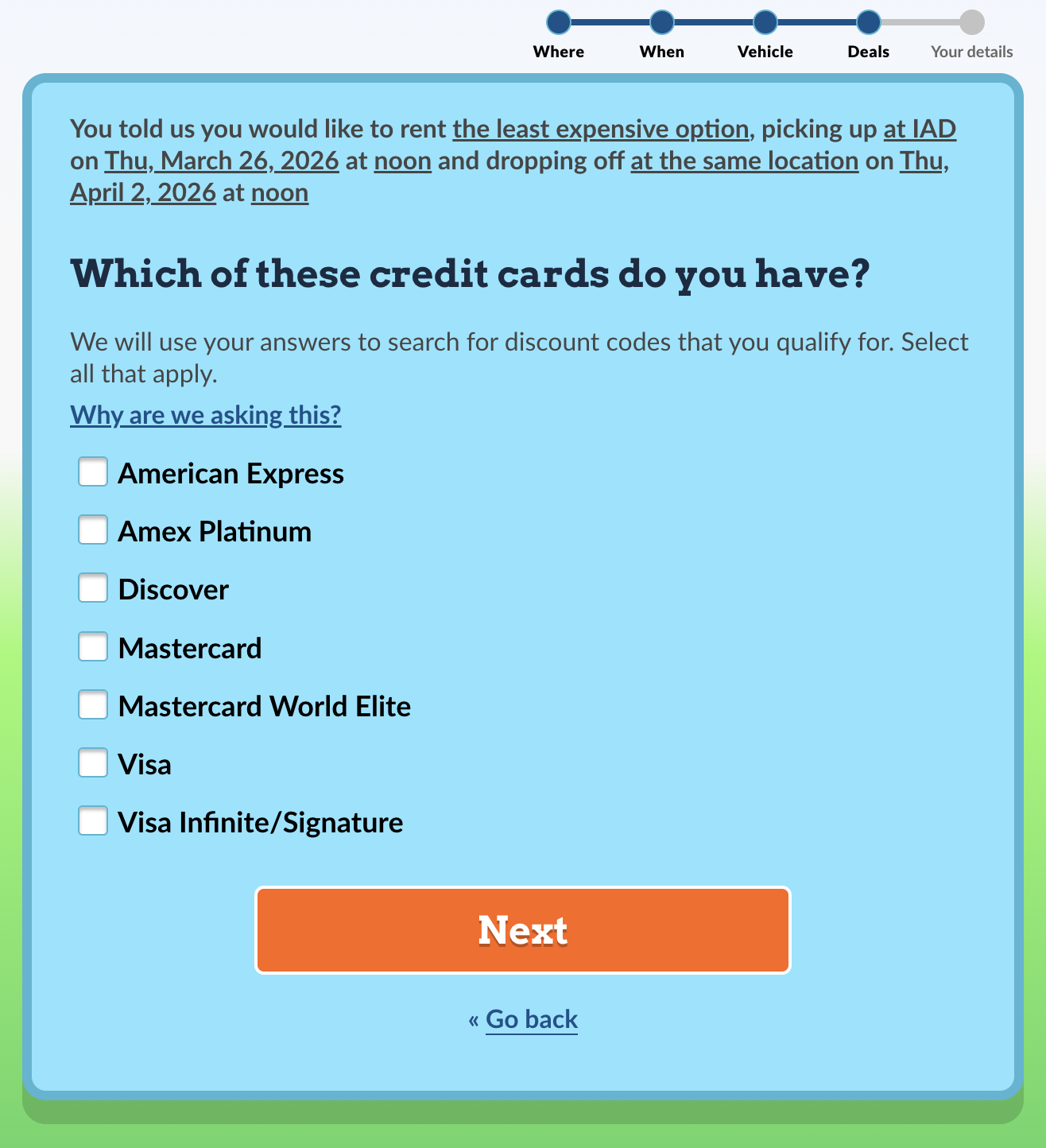
This screen is one of the brilliant features that differentiates AutoSlash from other rental car search engines. Here, you're prompted to select all types of credit cards you have. Some credit cards offer discount codes, and AutoSlash will automatically use those while searching for the cheapest rates.
On the next screen, you'll indicate which loyalty programs you belong to. The more memberships you have, the more coupon codes AutoSlash can utilize in conjunction with your search. This means better chances of saving money.
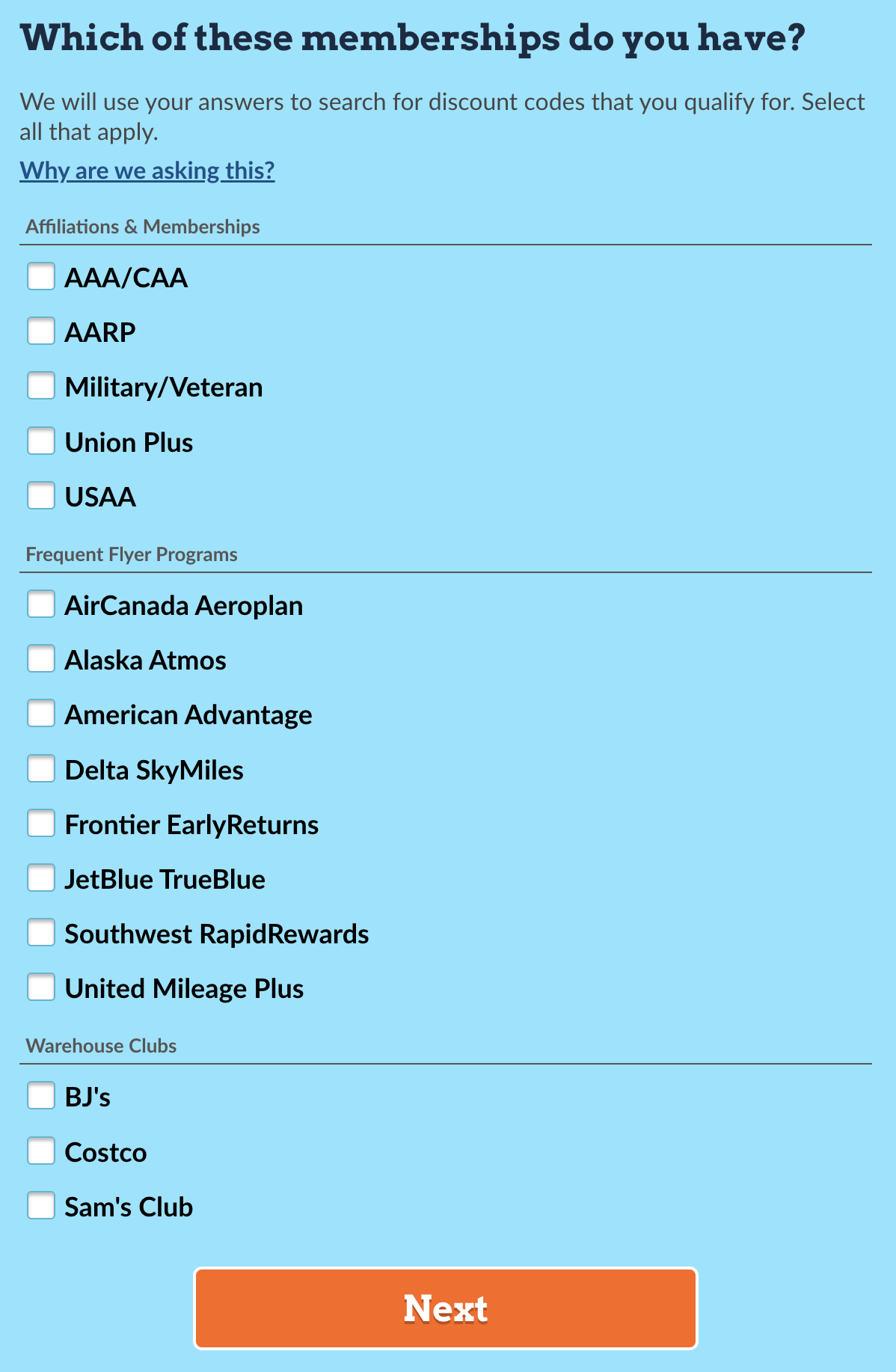
All of these memberships can offer discounts on car rentals—even the ones that are free to join. Before AutoSlash came along, the only way to take advantage of these program discounts was by searching one at a time, which is extremely tedious. AutoSlash saves you tons of time.
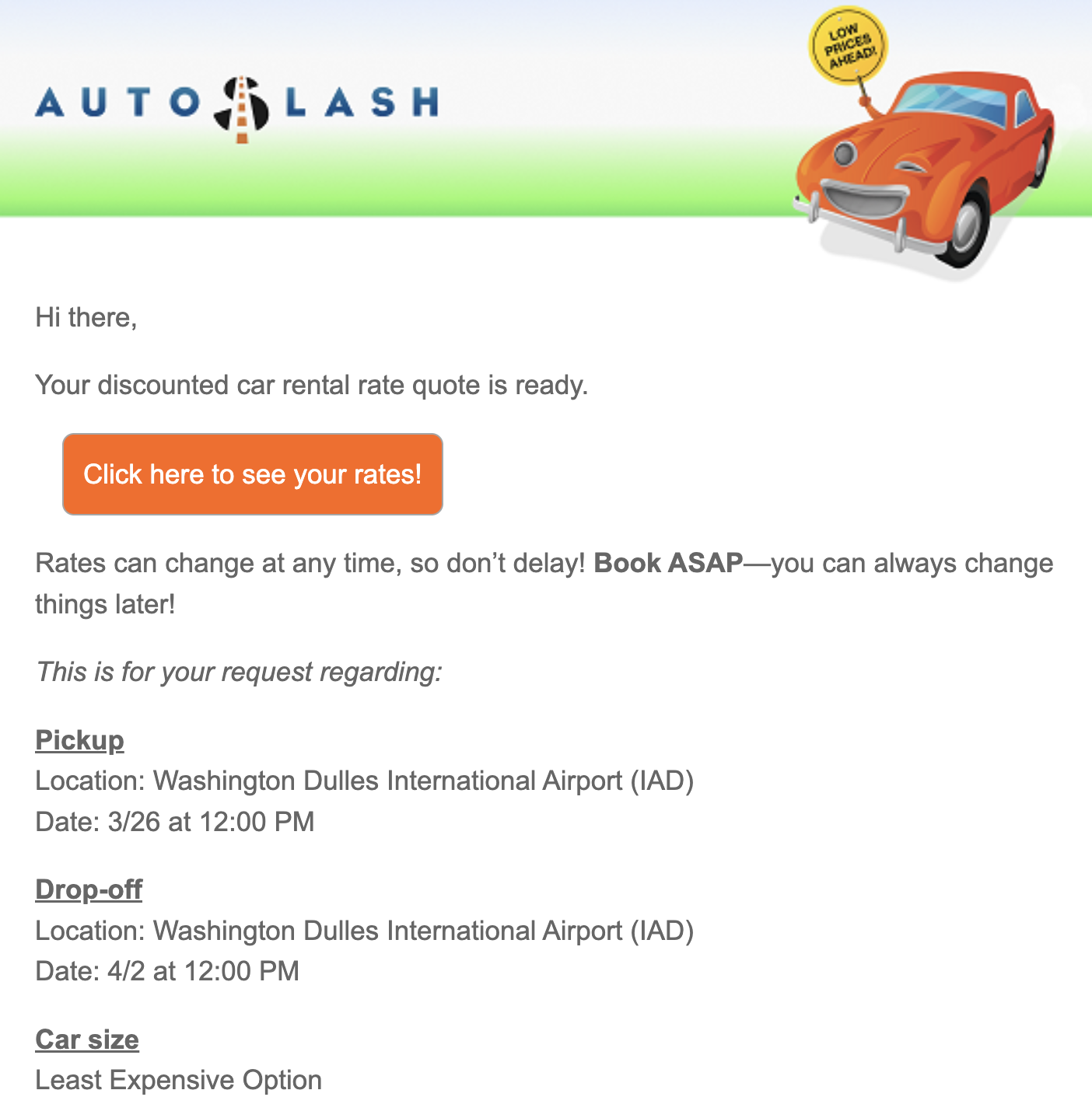
As the final step, you'll provide your name and email to complete your request. AutoSlash then analyzes all the information you provided to find the lowest rental prices and emails you customized quotes. In my experience, it takes approximately five minutes to receive this email.
Choose your preferred price
Your email will include a link that takes you back to Autoslash.com to view rental quotes. AutoSlash provides a variety of prices with different rental agencies and vehicle options. Look through them and compare the companies, vehicles offered, and the total price. AutoSlash orders the quotes from cheapest to most expensive, which is helpful.
This is a great time to look for your preferred rental agency. Do you have rental car elite status? You should also evaluate the rating AutoSlash assigns each rental company. If you know you'll be in a hurry, AutoSlash also provides details about where the rental agency is located (on-site versus shuttle needed). I find this information super helpful.
It's important to note that you won't always know which membership discount AutoSlash used to generate any individual quote. For this reason, it's not a good idea to request a quote with a membership you don't actually have. When picking up your car, employees may request proof of your membership (e.g., your Costco card) before handing over the keys.
Complete your reservation
After deciding on your preferred price, you may have up to four options to complete your booking:
- Pay later with Priceline
- Pay later with AutoSlash
- Pay now with Priceline
- Pay now with AutoSlash
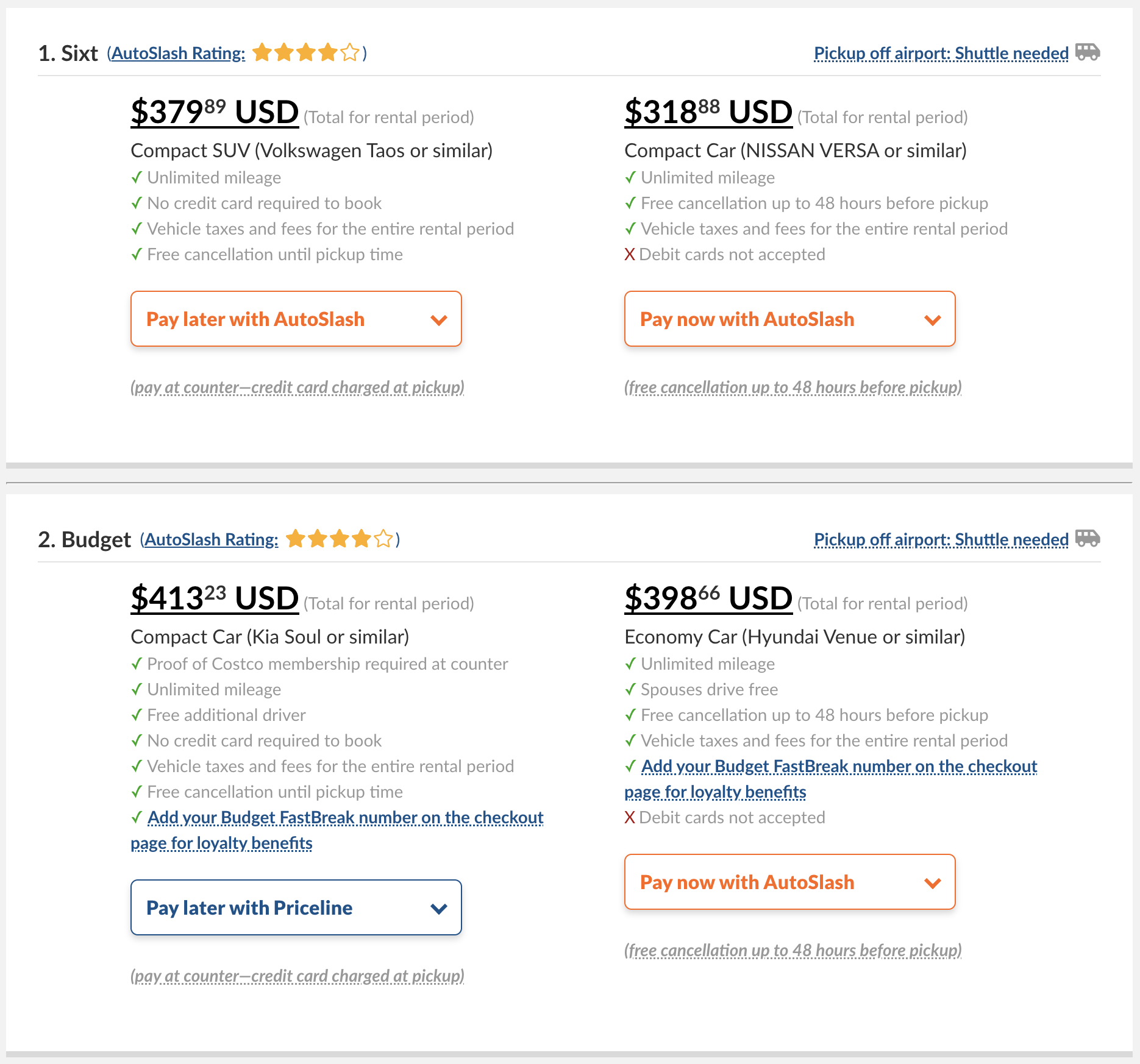
Priceline is the only booking service that accepts all discount codes and allows renters to book the flexible “Pay Later” rates at major rental agencies. This is why it's the only other option AutoSlash presents for booking the rates it finds.
Pay close attention to the booking option you choose. I'll discuss this more later, but I recommend opting for the more flexible “Pay Later” rates. That way, if your plans change, you won't get hit with a bill for a rental car you didn't use. Your plans have to be certain (and your flights not delayed) for Pay Now to make sense.
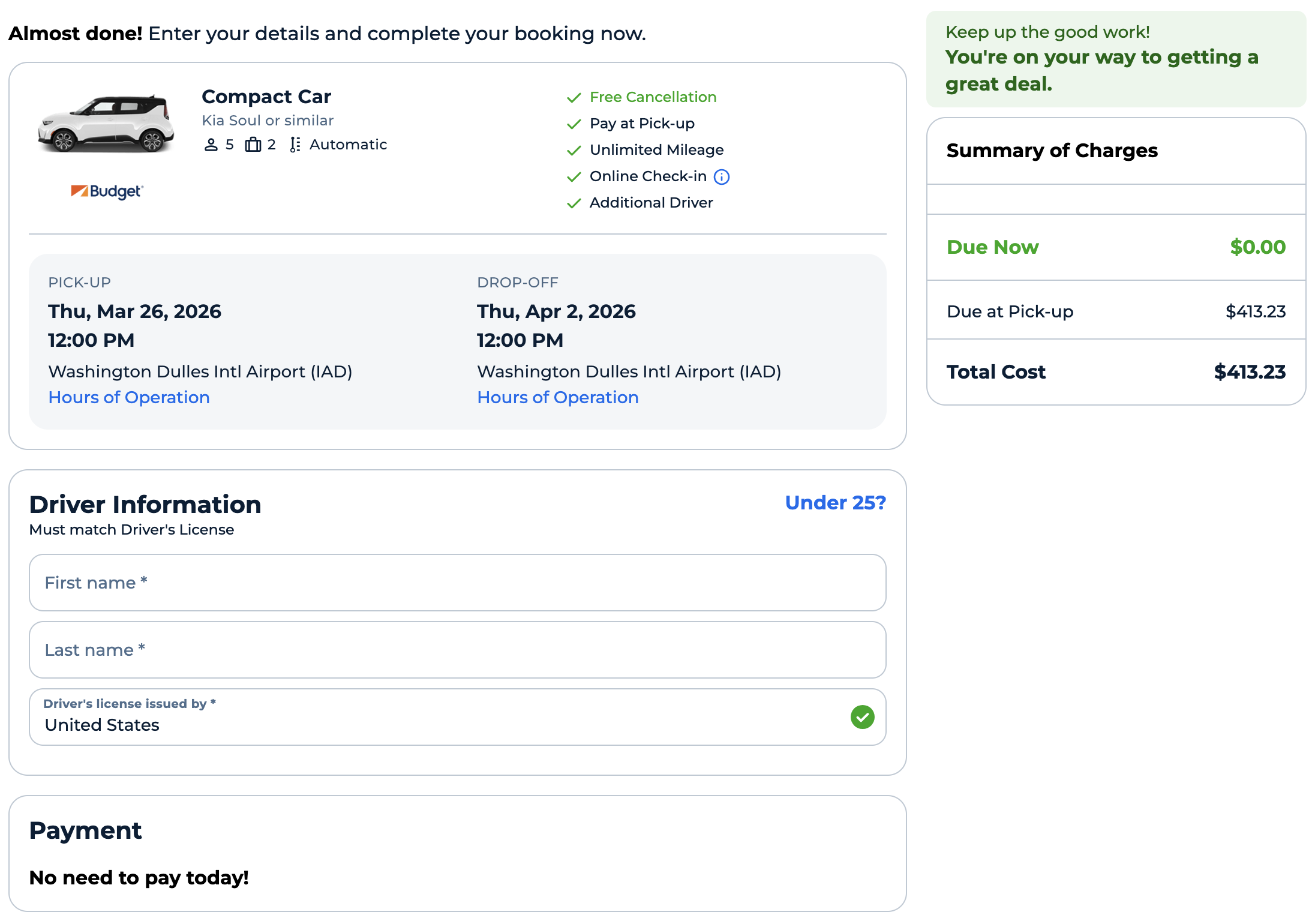
After selecting your rate, you're prompted for the usual car rental booking info: name, driver's license details, and contact information. If you have a rental car membership number, be sure to expand that field and add it before booking. Otherwise, it can be a pain to add it to your reservation later.
You'll also see options for a Collision/Damage Protection policy. Assuming you pay for your rental with a credit card offering primary damage coverage for rental cars, decline this coverage.
If you're looking for the best card to use, that's the Capital One Venture X Rewards Credit Card

- 10X miles per $1 on hotels and rental cars booked via Capital One Travel
- 5X miles per $1 on purchases through Capital One Entertainment
- 5X miles per $1 on flights when booking via Capital One Travel
- 5X miles per $1 on vacation rentals booked via Capital One Travel
- 2X miles per $1 on all other eligible purchases
Depending on the rental agency you choose, there may be additional options. Fields may be provided to make special requests, add your applicable loyalty number, and provide your flight details. After filling everything out, click the “Reserve My Rental Car” button. Your rental car is now reserved! It may seem like extra work, but Autoslash really does take a lot of hassle out of the process, doing so much of the legwork for you.
Use AutoSlash to Track Price Drops
Now that you've made a reservation, let's get notifications in case of price drops. This is one of the brilliant differences between AutoSlash and other rental car search engines. AutoSlash tracks your price if you fill out the “Track a Rental” form.
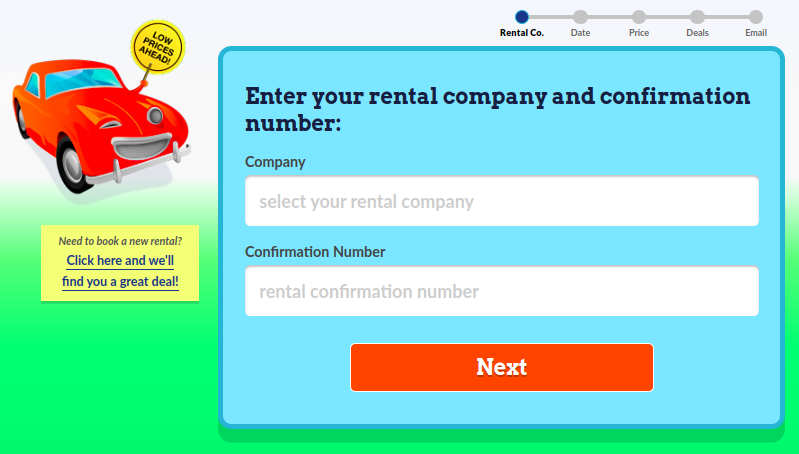
By now, you'll have an email confirmation from your rental company. To track the same criteria for price drops, you'll need the confirmation number, final price, and pick-up date from that email. Provide the requested information as you move through the tracking form and you'll receive a confirmation on the final page.
Then, just sit back and wait. Depending on how far in advance you've made your reservation (earlier is better), it's likely that AutoSlash will find a lower rate available between now and your pick-up date. If it does, you'll get an email similar to this:
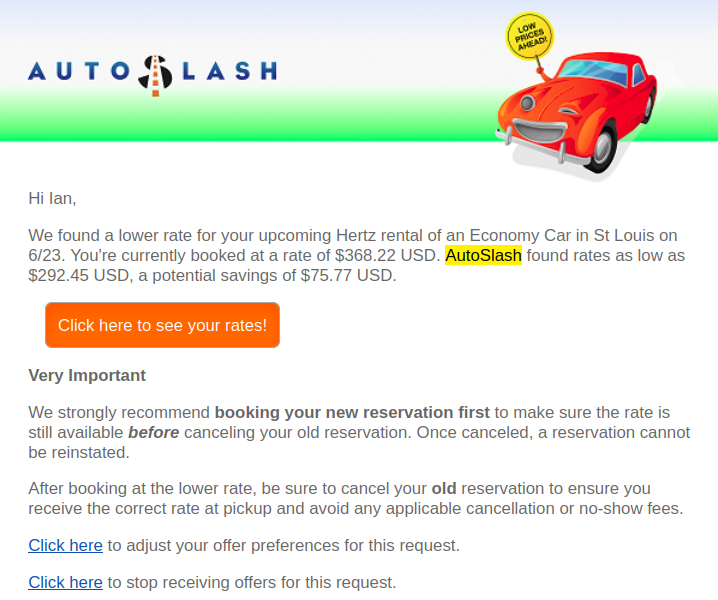
AutoSlash found some decent savings for this particular trip, and I gladly canceled and rebooked at the cheaper rate. More often than not, when I track a car rental price through AutoSlash, the service finds a lower rate. Again, the further out you book and enter your info into the tracking form, the more likely AutoSlash finds you savings.
Re-booking a cheaper price through AutoSlash
If you choose to rebook your rental car, it works just like the original booking process. Since this is a separate reservation, be sure to go back and cancel your previous reservation afterward! As AutoSlash points out, this is “to ensure you get the correct rate and avoid any applicable cancellation or no-show fees.” The price tracking feature is a key reason to book the flexible “Pay Later” rates. That being said, sometimes the savings of Pay Now can be worth it, but I find myself only selecting this if booking very close in.
Once you've made the new reservation and canceled the old one, set another price tracking request on AutoSlash's homepage for the new price. Rinse and repeat.
What if AutoSlash doesn't send you an email with lower rates? Pat yourself on the back, because you've managed to snag the best rental car deal for your dates.
Search Available Coupons
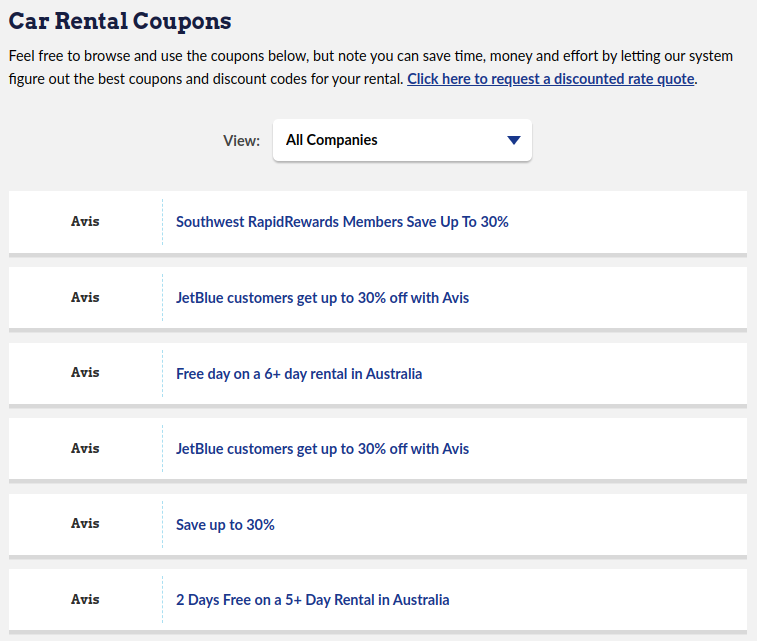
AutoSlash also has a third handy feature: You can search through the coupon catalog. This search page lets you filter for specific agencies, dates, and pick-up locations.
Personally, I think it's a lot faster to let AutoSlash do all the searching on my behalf with normal rate requests. I'm trying to avoid the hassle of lots of searching and comparison. That being said, I see how this feature could be useful for some.
AutoSlash Pro Tips
Play around with your pick-up and drop-off locations
This is a simple—but often overlooked—idea. Neighborhood rental agencies are often cheaper than airport car rental counters. If arriving at an airport, you could save a lot of money if you're willing to take a short ride to a neighborhood rental location. But make sure the cost is worth the hassle and time.
All but a couple of my one-way car rentals have been from neighborhood car rental locations. Sure, it's a short Uber ride or time on a mass transit system, but when rates are hundreds of dollars cheaper than renting from the airport, it's well worth the trouble. Compare prices between the airport and neighborhood locations to see if it's worth it for you. Remember to include the cost of getting from the airport to the rental location.
Only book the more flexible “Pay Later” rates
We cannot repeat this enough. Pay Later rates don't involve any prepayment, and they typically avoid harsh cancellation policies. Plus, they let you take full advantage of AutoSlash's price tracking. Using “Pay Later” is a no-brainer. Even if you can save a bit of money by locking yourself into a “Pay Now” rate, it won't be worth the hassle if your plans change. The only time I consider Pay Now is when I have to make a last-minute rental with firm plans. Weeks or months ahead? I would never consider the Pay Now option.
Request pick-up and drop-off times that fall squarely on 24-hour marks
Rental car prices are generally calculated based on daily, weekly, or monthly rates. That means that even if you need a rental car for only a few hours, you'll most likely pay for a full day. It can be worth giving yourself some extra time, even if you don't think you'll need it.
But beware. I once got into a pickle where a car rental agency was closed at the time I needed to return the car. Since I'd marked a later time, the booking engine assumed it was open. Many car rental locations allow off-hours returns, but this one didn't.
Play with the pick-up and drop-off times
If your plans are flexible, move the rental times a bit. I once changed my pick-up and drop-off slightly, moving away from a request on full 24-hour periods. I don't typically do this, but I received a significantly cheaper quote. The same can be said for pushing back my pick-up time by 90 minutes. If you have a few extra minutes, it can be well worth submitting multiple AutoSlash requests to see if different pick-up and drop-off times can save you money.
It's okay to pick up a rental car a little late, and it's okay to drop off a rental car a little early
Avoid the opposite. That's where you can run into fees! However, be aware of rental car company policies for dropping off a car outside of business hours. Most places have a key drop. As I mentioned before, I ran into a major issue once because the rental company didn't accept early drop-off! In general, though, there is some wiggle room with your pick-up and drop-off times. If you have a car reserved for 9:00 a.m. and show up at 10:00 a.m., the agency won't bat an eye.
Add your rental agency loyalty numbers when booking
For all “Pay Later” rates, you can add your membership numbers at the time of booking. Not only are you getting the best price, but this is the easiest way to take advantage of your loyalty status benefits. Don't have any status? Getting rental car status might be easier (and cheaper) than you thought, such as this simple Avis Preferred status match or claiming Hertz status with your credit card.
Don't wait until you're at the car rental counter to add your loyalty number. I've had agents enter it incorrectly more than once. Personally, I've only had seamless experiences with agencies honoring status and awarding points with AutoSlash bookings.
Book weekly or monthly rates to save even more
Rental agencies routinely offer steep discounts on weekly and monthly rentals. If your schedule allows it, try requesting a rate for seven days instead of five or six. The price difference might surprise you. In many cases, however, the car rental agency will book you at the weekly rate anyway.
Conversely, if you're not sure you need a car for six or seven days, just book for seven. You should pay the same rate.
Only book with rental agencies that have solid ratings
Rental agencies with poor AutoSlash ratings have a history of customer service issues. I've experienced most of the common issues firsthand. Trust me, they're not worth the savings. Stick to booking with the best agencies. You'll be glad you did.

One great use of AutoSlash is finding deeply discounted mid-size cars with National Car Rental. Not only do most National locations have solid ratings, this also lets you use National Executive Status granted for free to those with the Chase Sapphire Reserve®. You can bypass the counter entirely. Just choose whichever car you'd prefer at the Executive Emerald Aisle and drive away!
More often, I've done the same with Hertz, taking advantage of the Five Star and Presidents Circle status I've had at times as a Delta Medallion member.
Compare AutoSlash to corporate codes.
If you have corporate discount codes at your disposal, those may be worth checking. One thing AutoSlash can't do is check for rentals using these codes. You may save more by using a corporate code, so this is one extra search you want to make.
Final Thoughts
Bottom line: AutoSlash is an invaluable resource for road warriors and occasional travelers alike. It makes searching for the cheapest rental car an easy experience, and you can use its price tracking feature to save even more. I've had nothing but good experiences with AutoSlash. We hope you can use this guide to AutoSlash and its services to take the guesswork out of the rental car experience while saving lots of money.
Page Contents
- What is AutoSlash?
- Booking a Rental Car With AutoSlash
- Use AutoSlash to Track Price Drops
- Search Available Coupons
- AutoSlash Pro Tips
- Play around with your pick-up and drop-off locations
- Only book the more flexible “Pay Later” rates
- Request pick-up and drop-off times that fall squarely on 24-hour marks
- Play with the pick-up and drop-off times
- It's okay to pick up a rental car a little late, and it's okay to drop off a rental car a little early
- Add your rental agency loyalty numbers when booking
- Book weekly or monthly rates to save even more
- Only book with rental agencies that have solid ratings
- Compare AutoSlash to corporate codes.
- Final Thoughts