




AwardWallet receives compensation from advertising partners for links on the blog. The opinions expressed here are our own and have not been reviewed, provided, or approved by any bank advertiser. Here's our complete list of Advertisers.
Offers for the Capital One Spark Miles for Business are not available through this site. Some offers may have expired. Please see our card marketplace for available offers
If you hold an eligible Capital One credit card, you may already be familiar with the Capital One Travel portal. Available through a website and app, you can use your miles from Capital One credit cards to book flights, hotels, rental cars, travel packages, experiences, and premium hotel stays.
Depending on which Capital One card you carry, you can also earn bonus miles on eligible bookings made through Capital One Travel when paying with your card instead of redeeming rewards.
Like any travel portal, Capital One Travel comes with both advantages and drawbacks. In this guide, we'll break down how the portal works, what it does well, where it falls short, and what you should know before booking through it.
What Is the Capital One Travel Portal?
Capital One Travel is an easy-to-use website that helps you find and book travel. It is powered by Hopper, a travel booking platform that uses historical pricing data to help predict when airfare prices rise or fall. The portal offers an expansive selection of flights, hotels, rental cars, vacation packages, and activities. It also offers exclusive discounts and special access to premium hotels.
You have two options to pay for travel booked through Capital One Travel:
- Use cash and earn miles
- Use your miles to pay at checkout
When paying with Capital One credit cards, you'll earn anywhere from 5X–10X miles on your purchase. These miles can be used later to offset travel purchases or transferred to Capital One airline and hotel partners. Even though it's possible to redeem miles to pay for Capital One Travel portal bookings, we don't recommend doing so. More on that below.
Who can access Capital One Travel?
Initially, only those with miles-earning cards had access to Capital One Travel. This includes the following cards:
- Capital One VentureOne Rewards Credit Card
- Capital One Venture Rewards Credit Card
- Capital One Venture X Rewards Credit Card
- Capital One VentureOne Business Card
- Capital One Venture Business
- Capital One Venture X Business

- Earn 75,000 Miles once you spend $4,000 on purchases within the first 3 months of account opening
- 5X miles on hotels, vacation rentals and rental cars booked through Capital One Travel
- 2X miles on all other purchase
- Fee credit for Global Entry or TSA Pre✔® (up to $120)
- No foreign transaction fees
- $95 annual fee
- 5X miles per dollar on purchases through Capital One Entertainment
- 5X miles per dollar on hotels, vacation rentals and rental cars booked through Capital One Travel
- 2X miles per dollar on all other purchases
However, access to the portal has been expanded to those with cash-back credit cards, such as:
- Capital One Quicksilver Cash Rewards Credit Card
- Capital One Savor Cash Rewards Credit Card
- Capital One Spark Cash Plus
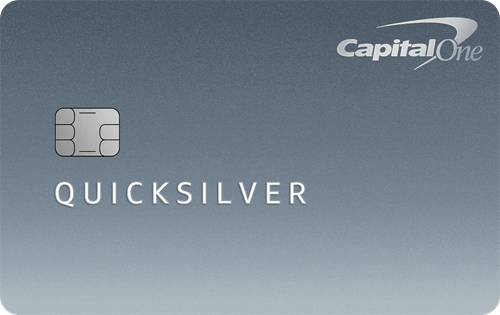
- Earn $200 Cash Back after you spend $500 on purchases within 3 months from account opening
- 1.5% cash back on every purchase, every day
- 5% cash back on hotels, vacation rentals, and rental cars booked through Capital One Travel
- No foreign transaction fees
- $0 annual fee
- 5% cash back on hotels, vacation rentals, and rental cars booked through Capital One Travel
- 5% cash back on purchases through Capital One Entertainment
- 1.5% cash back on every purchase, every day
Booking Flights With Capital One Travel
Eligible cardholders can access the Capital One Travel portal in multiple ways. The first option is to log in to your Capital One account. From there, scroll to your rewards and choose the “Travel” button.
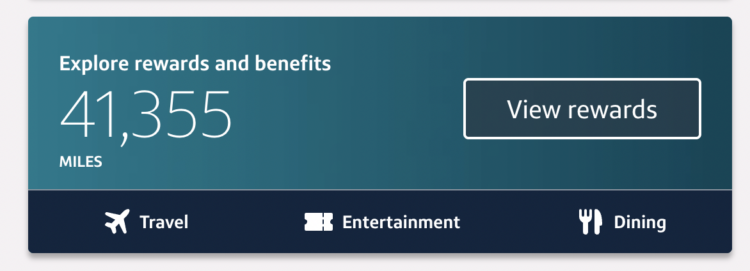
Additionally, on this same page, you can click “View rewards” to see all the ways to use your miles. From here, click “Discover Travel” or “Book a trip,” and Capital One Travel will open in a new tab.
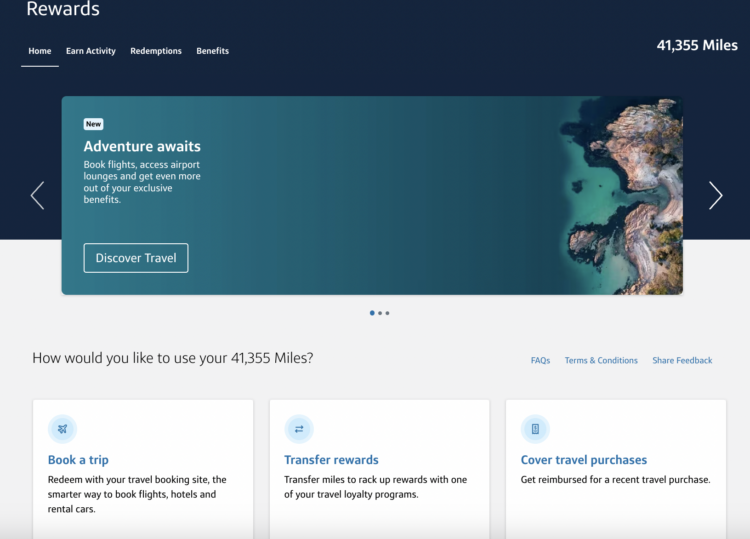
Alternatively, you can go directly to the Capital One Travel portal and log in to your account.
When booking flights, enter your departing and returning cities, dates, and number of passengers. A color-coded calendar will pop up once you click on select dates.
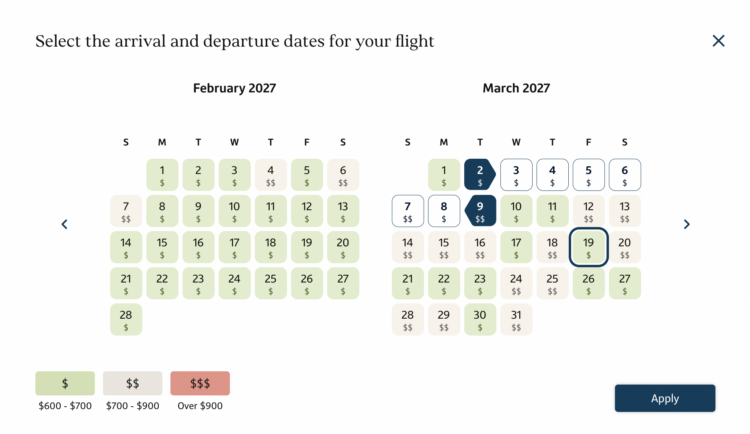
If you've used Hopper to book before, this may feel familiar. Each day is color-coded by price from lowest (green) to highest (red), with a key at the bottom showing approximate prices.
This is where Capital One Travel shines. You know you're getting a lower price if it's green. This is especially helpful if you have flexible dates.
You could save hundreds of dollars by shifting your dates forward or backward by a day or two. Those savings multiply when booking for an entire family.
Related: How Families Can Work Together To Pool Points and Miles
Once you've selected your dates, you'll be taken to your flight options. You can filter by fare class, number of stops, airlines, etc. Additionally, you can sort by price, departure and arrival time, stops, and duration.
Price prediction
Capital One Travel offers a few handy features when booking flights. First, at the top of the booking page, you'll see an explanation of why you should or should not book the flight based on the price predictions for your route. If Capital One Travel suggests waiting, you can set up a free price watch to keep an eye on prices and be alerted to book if/when prices drop.
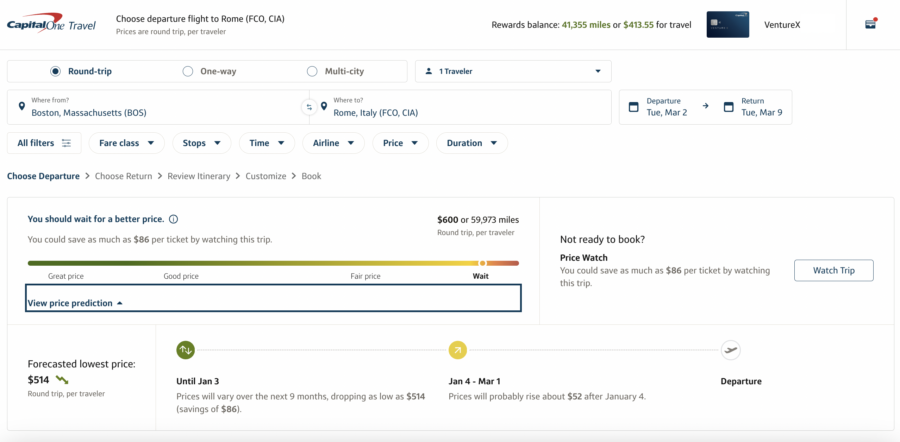
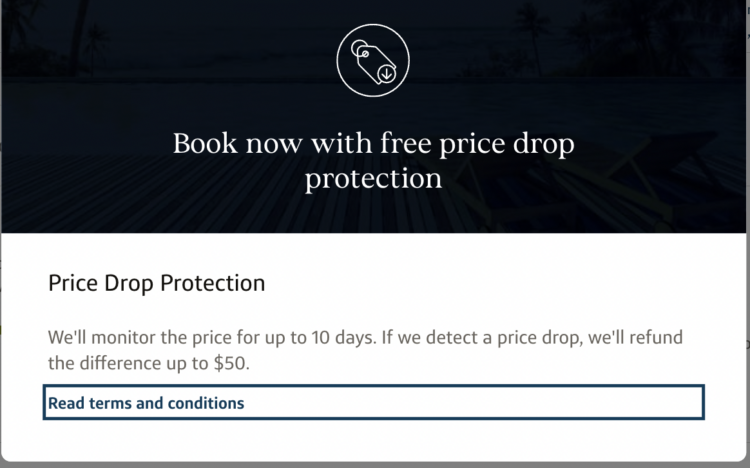
If the site suggests booking now, you'll automatically be enrolled in Capital One price match protection. If the price drops within 10 days of booking, you'll get a refund as a Capital One Travel credit. You can get up to $50 in credit, which can be used for anything in the Capital One Travel portal.
Price freeze
Another feature is the price freeze option — available on select flights. For a small fee, you can freeze the flight price for up to 14 days. If the price goes up during this time, Capital One will cover the difference — up to $500. If the fare decreases during that period, you'll pay the lower price instead. On the off chance that the flight sells out and no seats are available, you'll get a refund for the cost of freezing the price.
The cost of freezing a price varies based on route, how far in advance you're booking, and travel dates.
Note that you can't use price freeze if your flight departs within 36 hours.
Flight details
Finally, once you've selected your flight, Capital One Travel offers a very comprehensive look at the flight details and each class fare. You'll see what's included in each option and how much it will cost.
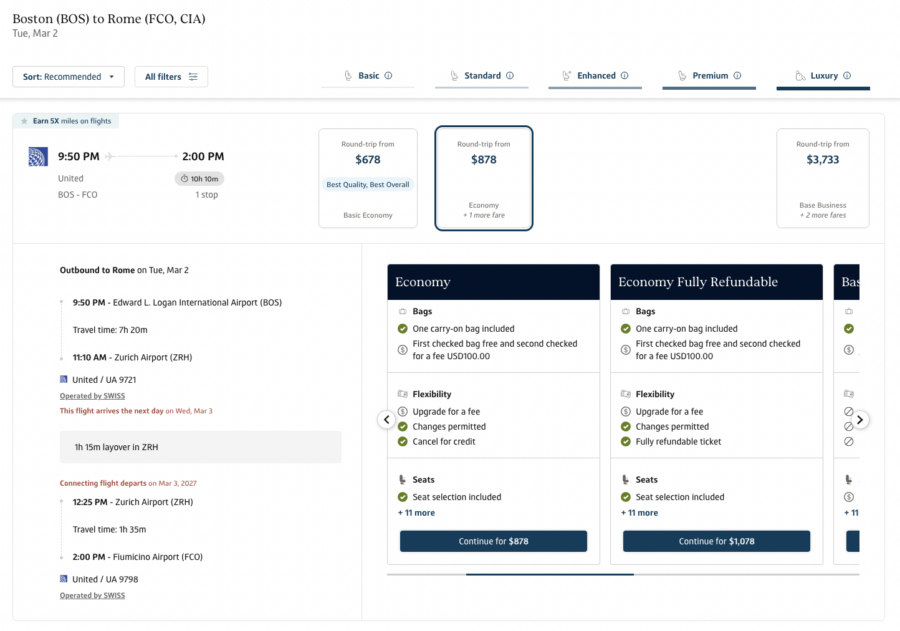
After you decide which flight is best, go through the standard booking process of entering your personal information and payment details.
Booking Hotels and Rental Cars With Capital One Travel
Booking hotels and rental cars is a simple process — for better or worse. There are no color-coded systems, price freezes, or price drop protections. Instead, it works like any other travel portal. Simply enter your location and dates, and Capital One Travel will present all of the booking options. You can sort and filter by price, features, stars, etc.
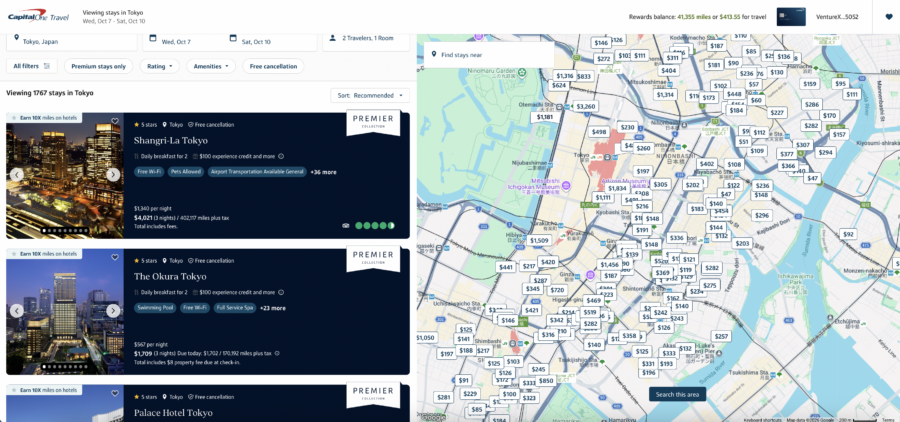
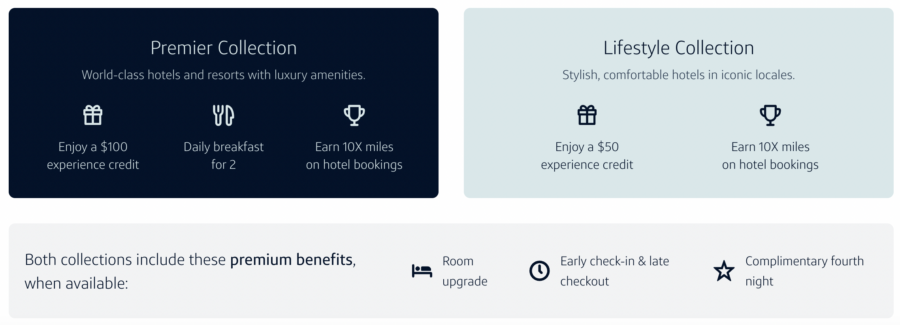
When browsing hotels, you'll notice that Premier Collection hotels are listed first. This is a curated collection of luxury hotels around the world that provides extra perks on each reservation, including daily breakfast for two, a $100 resort credit, complimentary Wi-Fi, room upgrades when available, and late checkout when available.
Capital One's other hotel program is the Lifestyle Collection, offering complimentary Wi-Fi, room upgrades when available, and a $50 experience credit.
With hotels and rental car bookings, you check out as you normally would — providing your personal details and payment method — including the ability to pay with miles.
Booking Activities Through Capital One Travel
In partnership with TripAdvisor, you can book activities such as tours, skip-the-line tickets, cooking classes, food tastings, shows, and more through Capital One Travel.
You can filter the results by ratings, time of day, duration, and price. Or narrow them down by choosing a location button listed at the top of the search results page.
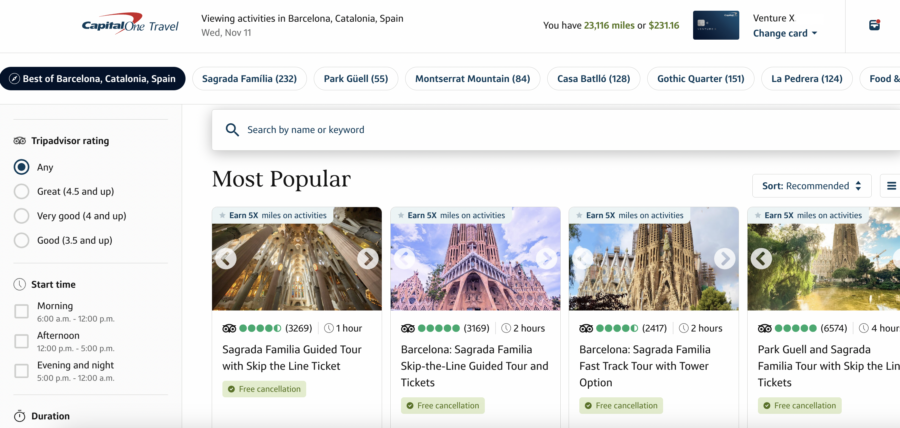
When using your Capital One Venture X or Venture X Business to pay, you'll earn 5X on any activities you book.
Earning and Using Miles With Capital One Travel
As you go through the booking process in the portal, Capital One Travel will give you the option to pay with a credit card or redeem miles to cover the cost of the reservation.
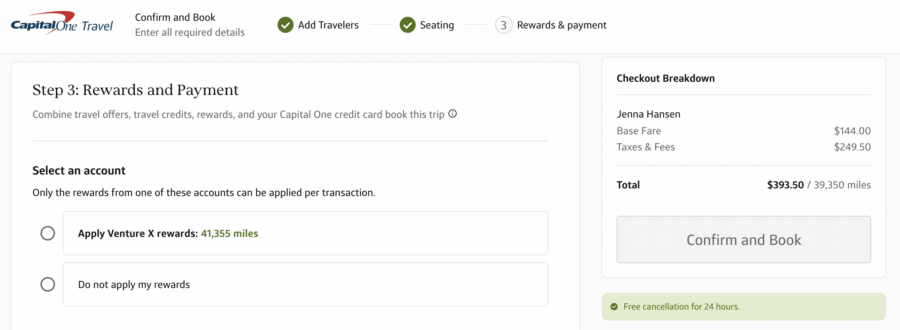
While this may be tempting, we don't recommend redeeming Capital One miles through Capital One Travel. That's because travel booked in the Capital One Travel portal earns extra miles if you pay with the right credit card.
With the Capital One Venture X or Venture X Business, you'll earn 10X miles on hotels and rental cars booked through Capital One Travel, 5X miles on flights and vacation rentals booked through Capital One Travel, and 2X miles on other eligible purchases. With the Capital One Venture, you'll earn 5 miles per dollar on hotels and rental cars booked through Capital One Travel.
Because of this, it's better to pay with your credit card, earn the extra miles, and then go to your account and apply your rewards as a statement credit. You're still using rewards to pay, but you're also earning miles for the purchase and coming out ahead.

- 10X miles per $1 on hotels and rental cars booked via Capital One Travel
- 5X miles per $1 on purchases through Capital One Entertainment
- 5X miles per $1 on flights when booking via Capital One Travel
- 5X miles per $1 on vacation rentals booked via Capital One Travel
- 2X miles per $1 on all other eligible purchases
Using the Capital One Venture X and Venture X Business $300 Travel Credit
The Capital One Venture X or Venture X Business come with an annual $300 travel credit. This is a helpful way to offset most of the cards' high annual fees.
A few years ago, Capital One changed how this credit is redeemed. Now the credit is applied during the reservation checkout process — much like a discount or coupon.
You can choose whether to apply your annual credit when making a reservation. Or you can even select “edit amount” to apply a portion of your credit to a specific booking. If your booking is less than $300, you can use the remaining credit on a future reservation.
Once you check out, you will see the credit listed as a discount on the booking.
The Capital One Travel App
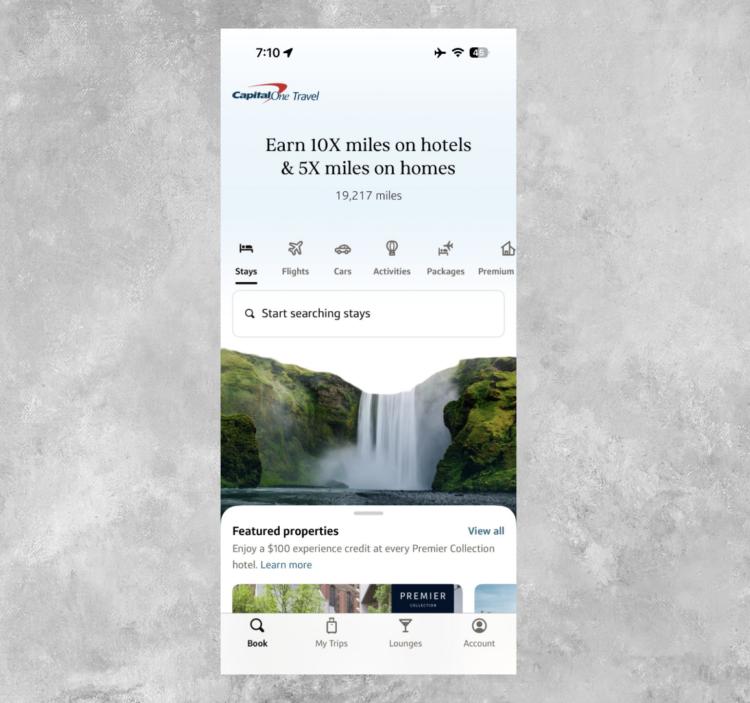
On March 17, 2026, Capital One launched the new Capital One Travel app. This app works very similarly to the Capital One Travel website, allowing you to book new travel and track your current reservations. It also streamlines lounge access options, helping you see which lounges are available to you based on your card(s). You can see wait times and join the lounge waitlist right from the app.
Furthermore, it helps you keep track of your rewards balance, travel credits, and card benefits.
Limitations of the Capital One Travel Portal
The Capital One Travel portal has a few limitations that travelers should be aware of:
- Hotel bookings made through the portal typically won't count toward earning hotel elite status. If you value the benefits of status, using the Capital One Travel portal may not be the best option. However, if that's not a factor for you, it may not matter.
- You may use fewer miles by transferring to a travel partner for an award. Transferring miles to a Capital One transfer partner is a great way to ensure you get maximum value for your miles.
- Southwest Airlines does not show up on flight searches. If you like flying Southwest, it may be worth checking its website separately before deciding on your best option.
- Not every flight option is available through Capital One Travel. Although Capital One Travel will show seemingly endless flight results, advanced travelers might not find the specific routing or flight option they hope to book.
Bottom Line
Capital One has done a great job creating a travel portal that is easy to use, offers helpful features, and provides flexibility in booking and payment options. The new Capital One Travel app adds to the ease of using the Capital One Travel portal. Plus, with benefits like price freeze and price drop protection, it's easy for travelers to feel confident about booking.
While there are a few limitations to Capital One Travel, they aren't enough to prevent the portal from being a great option for most travelers.
- Earn 75,000 Miles once you spend $4,000 on purchases within the first 3 months of account opening
- 5X miles on hotels, vacation rentals and rental cars booked through Capital One Travel
- 2X miles on all other purchase
- Fee credit for Global Entry or TSA Pre✔® (up to $120)
- No foreign transaction fees
- $95 annual fee
- 5X miles per dollar on purchases through Capital One Entertainment
- 5X miles per dollar on hotels, vacation rentals and rental cars booked through Capital One Travel
- 2X miles per dollar on all other purchases
Page Contents
- What Is the Capital One Travel Portal?
- Who can access Capital One Travel?
- Booking Flights With Capital One Travel
- Booking Hotels and Rental Cars With Capital One Travel
- Booking Activities Through Capital One Travel
- Earning and Using Miles With Capital One Travel
- Using the Capital One Venture X and Venture X Business $300 Travel Credit
- The Capital One Travel App
- Limitations of the Capital One Travel Portal
- Bottom Line